


Brian GagneCo-founder and CTO, Kief Studio
- Published
- 13 min read

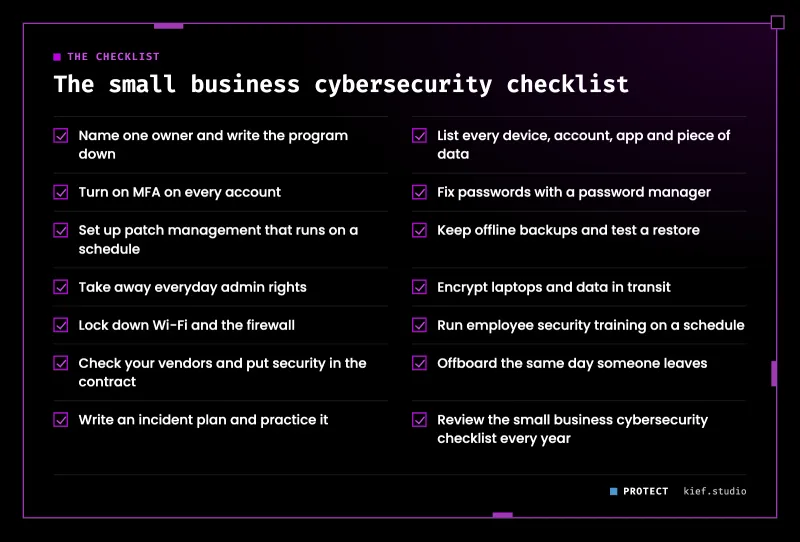
TL;DR: A small business cybersecurity checklist for Massachusetts has 14 items, in this order: name an owner, list what you have, turn on MFA, fix passwords, patch, back up and test, cut admin rights, encrypt, lock down the network, train staff, check vendors, offboard the same day, plan for incidents, and review every year.
A small business cybersecurity checklist is only useful if you can tell when each line is finished. Most lists stop at "use strong passwords" and leave you guessing what done looks like.
This small business cybersecurity checklist is built from the government guidance small businesses are pointed to anyway: NIST's Cybersecurity Framework 2.0 quick-start guide, CISA Cyber Essentials, the FTC's small business pages, and the Massachusetts rule for any business that holds residents' personal information, 201 CMR 17.00. Each item says what it is, why it sits where it does, and what "done" means, so you can check it off and move on.
What should a small business cybersecurity checklist include?
Start with the frame the federal government built for small businesses. NIST's quick-start guide is written for businesses "who have modest or no cybersecurity plans in place," and it organizes the work into six Functions: Govern, Identify, Protect, Detect, Respond and Recover. (NIST SP 1300, February 2024 (opens in a new tab)) A good small business cybersecurity checklist touches all six, which is why the list below runs from ownership to recovery and not only through the technical controls.

CISA's version of the same idea is Cyber Essentials, "a guide for leaders of small businesses" built around six essential elements: yourself, your staff, your systems, your surroundings, your data and your crisis response. (CISA, Cyber Essentials (opens in a new tab)) Different words, same shape: people, systems, data, and a plan for the bad day.
Order matters because of where breaches actually start. In Verizon's 2026 Data Breach Investigations Report, exploited software flaws became the most common way in, at 31% of breaches, ahead of stolen or abused credentials at 13%. A third party was involved in 48% of breaches and the human element in 62%. (Verizon DBIR 2026 executive summary, May 2026 (opens in a new tab); Verizon, May 19, 2026 (opens in a new tab)) Put those numbers next to each other and the first page of the list writes itself: patching, logins, people and vendors.
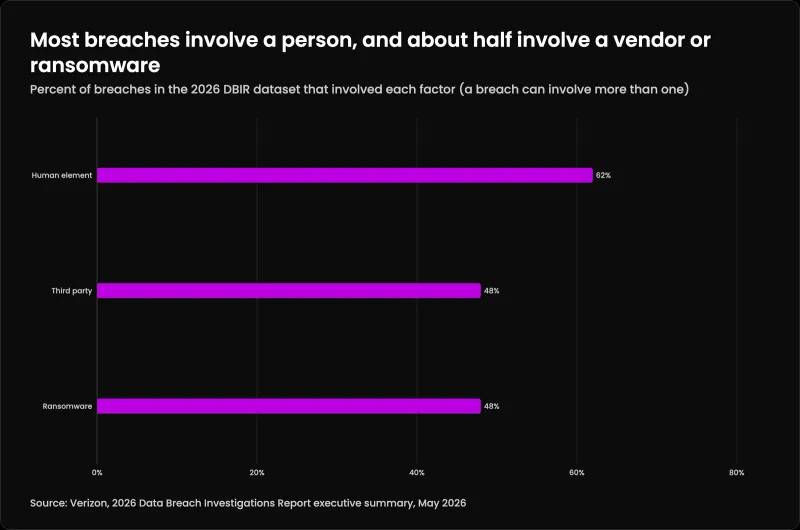
| Factor | Share of breaches |
|---|---|
| Human element | 62% |
| Third party | 48% |
| Ransomware | 48% |
The small business cybersecurity checklist, in order
Work top to bottom. Each item has a "done when" line. If you cannot point to the proof, it is not done yet.

1. Name one owner and write the program down
Somebody has to own this. CISA's small business guidance gives the owner a short job list: establish a culture of security, pick a security program manager, approve the incident response plan, and take part in drills. (CISA, Cyber Guidance for Small Businesses, April 2024 (opens in a new tab))
In Massachusetts, writing it down is not optional for any business that holds residents' personal information. 201 CMR 17.03 says anyone who owns or licenses residents' personal information "shall develop, implement, and maintain a comprehensive information security program that is written in one or more readily accessible parts." (201 CMR 17.03, via Cornell LII (opens in a new tab)) That written information security program, the WISP, is where this whole small business cybersecurity checklist ends up living.
Done when: one named person owns security, and a dated document says what you protect and how.
2. List every device, account, app and piece of data
NIST puts it plainly: "Before you can protect your assets, you need to identify them." The guide asks for an inventory of hardware, software, systems and services, and says to prioritize "inventorying and classifying your business data." (NIST SP 1300, February 2024 (opens in a new tab))
Keep it simple. A spreadsheet with four columns works: what it is, who uses it, what data it touches, and whether it has multifactor login. That last column feeds the next item.
Done when: you can say where customer, employee and payment data lives, and nobody on staff is surprised by a device or a login on the list.
3. Turn on MFA on every account
Multifactor login is the cheapest big win on any small business cybersecurity checklist. CISA says using it "makes you 99% less likely to be hacked." (CISA, Multifactor Authentication (opens in a new tab)) The FTC tells small businesses to "require multi-factor authentication for all employees, contractors, and others who access your network and devices." (FTC, Cybersecurity for Small Business (opens in a new tab))
Order inside the item: CISA says MFA should cover all users, "but start with privileged, administrative, and remote access users." (CISA, Cyber Essentials (opens in a new tab)) Admin and remote access accounts first, along with email and banking, then everything else. For email, VPNs and accounts that reach critical systems, CISA's ransomware guide goes further and asks for phishing-resistant MFA. (CISA #StopRansomware Guide, September 2023 (opens in a new tab))
Done when: MFA on every account is a yes in your inventory column, and the few that cannot support it are named with a plan.
4. Fix passwords with a password manager
The FTC's floor is a strong password of "at least 12 characters." (FTC, Cybersecurity for Small Business (opens in a new tab)) NIST adds two steps people skip: use password managers to generate and protect strong passwords, and change default manufacturer passwords on routers, printers and cameras. (NIST SP 1300 (opens in a new tab)) my wife and partner, Amelia, makes the case for why a password manager is the best security investment (opens in a new tab) a small team can make.
Done when: everyone uses the company password manager, shared logins live in shared vaults, and no device still runs on its factory password.
5. Set up patch management that runs on a schedule
CISA calls patching "one of the most cost-effective practices to improve your security posture." (CISA, April 2024 (opens in a new tab)) The 2026 DBIR shows why it is item five and not item fifteen: exploiting a software flaw was the most common way breaches started, and only 26% of the flaws on CISA's actively exploited list were fully fixed in 2025, with a median of 43 days to get there. (Verizon DBIR 2026 executive summary (opens in a new tab))
Patch management means turning on automatic updates where you can, as both the FTC and NIST advise, and owning the rest: firewalls, routers, servers and the one old PC that runs the label printer. Our note on vulnerability management for a small team covers how to run it without a security department.
Done when: a monthly list shows every device's update status, and anything overdue has a name next to it.
6. Keep offline backups and test a restore
CISA's ransomware guide says to "maintain offline, encrypted backups of critical data" and to test backup procedures on a regular basis. (CISA #StopRansomware Guide (opens in a new tab)) Its small business page is sharper: "It's critical to regularly test partial and full restores." (CISA, April 2024 (opens in a new tab)) Ransomware showed up in 48% of all breaches in the 2026 DBIR, and Verizon says small organizations are disproportionately hit by it. (Verizon DBIR 2026 (opens in a new tab))
Offline backups are the copy ransomware cannot reach. Our guide to 3-2-1 backups for Central Massachusetts businesses walks through the setup.
Done when: you know the date of the last test restore, how long it took, and that one copy sits offline.
7. Take away everyday admin rights
CISA tells the IT lead to "remove administrator privileges from user laptops." (CISA, April 2024 (opens in a new tab)) NIST says to restrict sensitive information "to only those employees who need it to do their jobs." (NIST SP 1300 (opens in a new tab)) Massachusetts asks for the same thing in 201 CMR 17.04: access limited to those who need it, and unique logins that are not vendor default passwords. (201 CMR 17.04, via Cornell LII (opens in a new tab))
Done when: daily work happens on a normal account, admin accounts are separate and few, and the shared drive has folders only the right people can open.
8. Encrypt laptops and data in transit
NIST says to configure tablets and laptops for full-disk encryption. To the extent technically feasible, 201 CMR 17.04 requires encryption of personal information stored on laptops and other portable devices, and of records sent across public networks or wirelessly. (201 CMR 17.04 (opens in a new tab)) A stolen laptop with encryption on is a hardware loss. Without it, it may be a reportable breach.
Done when: every laptop and phone that touches business data shows encryption on, and you have checked rather than assumed.
9. Lock down Wi-Fi and the firewall
The FTC says to make sure your router offers WPA2 or WPA3 encryption "and that it's turned on." (FTC, Cybersecurity for Small Business (opens in a new tab)) Massachusetts asks for "reasonably up-to-date firewall protection and operating system security patches" on systems that hold personal information. (201 CMR 17.04 (opens in a new tab)) If you are wondering whether the box from your internet provider is enough, our note on whether a small business needs a firewall lays out the choices.
Done when: guest Wi-Fi is separate from staff Wi-Fi, the router admin password is changed, and the firewall's firmware is current.
10. Run employee security training on a schedule
The FTC says to "create a culture of security by training your employees on a regular schedule." (FTC (opens in a new tab)) 201 CMR 17.03 calls for ongoing training that includes temporary and contract staff. (201 CMR 17.03 (opens in a new tab)) The DBIR adds a detail worth putting in the training itself: in phishing simulations, the median click rate on text and voice lures was 40% higher than on email. (Verizon DBIR 2026 (opens in a new tab))
So employee security training has to cover the phone, not only the inbox. Amelia looked at whether security awareness training works (opens in a new tab) and what makes it stick.
Done when: every person, contractors included, has a training date in the last year and knows exactly who to tell when something looks off.
11. Check your vendors and put security in the contract
With a third party involved in 48% of breaches in the DBIR, vendors belong on any small business cybersecurity checklist. Massachusetts requires covered businesses to take reasonable steps to pick service providers that can protect personal information, and to require it "by contract." (201 CMR 17.03 (opens in a new tab))
Done when: you have a vendor list with the data each one holds, and the contracts for the ones that hold personal information include security terms.
12. Offboard the same day someone leaves
201 CMR 17.03 requires "preventing terminated employees from accessing records containing personal information." (201 CMR 17.03 (opens in a new tab)) In practice that means a checklist that runs on the last day, not the next week. I wrote a full employee offboarding checklist for IT access (opens in a new tab), and our IT onboarding checklist covers the other end.
Done when: the last person who left lost every login on their last day, and you can show the record.
13. Write an incident plan and practice it
CISA asks small businesses to write an incident response plan and to hold tabletop exercises every quarter. (CISA, April 2024 (opens in a new tab)) The plan needs a Massachusetts line too: Chapter 93H requires notice "as soon as practicable and without unreasonable delay" to the attorney general and the director of consumer affairs and business regulation when residents' personal information is breached. (M.G.L. c.93H, Section 3 (opens in a new tab)) Our note on the first 24 hours after a breach shows what a plan has to answer.
Done when: a one-page plan names who calls whom, it lives somewhere you can reach if email is down, and you have walked through it once.
14. Review the small business cybersecurity checklist every year
201 CMR 17.03 asks you to review the scope of your security measures "at least annually," and sooner when the business changes in a material way. (201 CMR 17.03 (opens in a new tab)) New office, new software, new hires with remote access: each one is a reason to run the small business cybersecurity checklist again.
Done when: the WISP has this year's date and a short note on what changed.
What does Massachusetts add to the checklist?
The federal guidance is advice. In Massachusetts, much of it is also the rule for any business that holds residents' personal information. 201 CMR 17.04 lists the computer controls by name: secure logins, access limited to people who need it, encryption on laptops and over public networks, current firewall and patches, malware protection, and employee training on the security system. (201 CMR 17.04 (opens in a new tab))

That is why a small business cybersecurity checklist written for Massachusetts doubles as the outline of your written information security program. Amelia covers the WISP itself in Massachusetts WISP requirements under 201 CMR 17 (opens in a new tab). For the official sources behind it, MyRHC keeps an index of NIST CSF 2.0 documents (opens in a new tab).
One distinction keeps the paperwork honest. A WISP that describes controls nobody turned on does not protect anyone. Our knowledge base note on compliance versus security and the note on why compliance is not security explain the gap.
How do you work through a small business cybersecurity checklist without stalling?
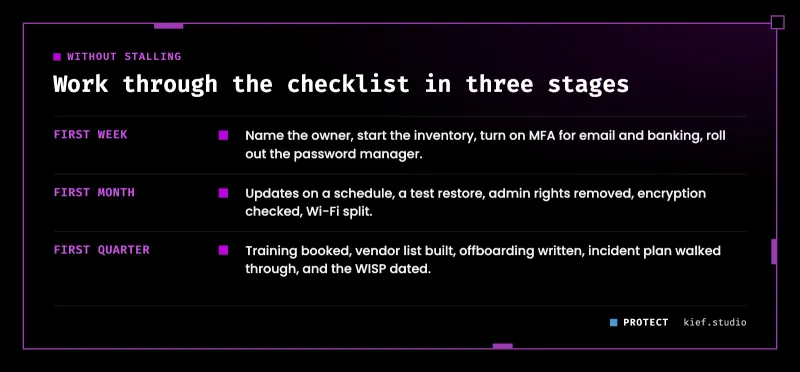
A fourteen-item small business cybersecurity checklist is a lot for an owner who also runs payroll. Split it into three passes.
- First week: items 1 through 4. Name the owner, start the inventory, turn on MFA for email and banking, roll out the password manager. Amelia's list of the five cybersecurity things every business should do first (opens in a new tab) is a good companion for this pass.
- First month: items 5 through 9. Updates on a schedule, a test restore, admin rights removed, encryption checked, Wi-Fi split.
- First quarter: items 10 through 14. Training booked, vendor list built, offboarding written, incident plan walked through, and the WISP dated.
Here is how that might look. A nine-person accounting office in Grafton could finish the first pass in two afternoons, because MFA and a password manager are settings and habits, not purchases. The second pass is where it may want help: the server in the closet, the old scanner PC, the backup nobody has restored. The third pass is mostly writing, and the written version is what Massachusetts asks to see.
For more cybersecurity tips for small business owners in plain language, CISA's Secure Our World campaign boils the personal side down to four steps: avoid and report phishing, use strong passwords, use MFA and a password manager, and update software. (CISA, Secure Our World (opens in a new tab))
Frequently asked questions
What are the 5 C's of cybersecurity?
There is no official list. NIST and CISA do not define "5 C's," and versions online disagree on what the C's are. For a small business, the NIST CSF 2.0 Functions (Govern, Identify, Protect, Detect, Respond, Recover) are the better frame, and the checklist above follows them.
What are the 7 types of cybersecurity?
Lists of "types" vary by author, and no standards body publishes a set of seven. Common groupings include network, endpoint, application, cloud, identity, data, and people. A small business does not need the taxonomy; it needs each area covered by a line on its small business cybersecurity checklist.
What is the "90/10" rule in cybersecurity?
It is an informal rule of thumb, not a NIST or CISA term, and people use it in different ways. The useful takeaway is that a small set of basics, like MFA, patching, backups and training, carries most of the protection, which is why they sit at the top of this list.
How do I improve cybersecurity for my small business?
Turn on MFA for email and banking today, move everyone to a password manager, turn on automatic updates, and test one restore from your backup. Then work through the rest of a small business cybersecurity checklist in order, writing down what done looks like for each item.
What is the Massachusetts WISP law?
201 CMR 17.00 requires anyone who owns or licenses Massachusetts residents' personal information to keep a written information security program with specific safeguards. Amelia's WISP guide (opens in a new tab) covers what it must include.
How often should you review a small business cybersecurity checklist?
At least once a year, which matches the annual review 201 CMR 17.03 asks for, and again whenever something material changes, such as a move, a new system or remote staff. Patching and backup checks run monthly between reviews.
Is a small business cybersecurity checklist enough on its own?
It is the foundation, not the finish. A checklist shows the controls exist; testing shows they hold. Once the basics are in place, a scan or a penetration test tells you whether an attacker could still get in.
This article is general information, not legal advice. Kief Studio is not a law firm, and reading it does not create an attorney-client relationship. Laws and regulations change, so check the current text and talk with a licensed Massachusetts attorney about your situation.
Where we fit
Most of this small business cybersecurity checklist is work an owner can start this week. Where it gets harder is the systems: the applications, servers and data your business actually runs on. That is the part Kief Studio covers. Our managed security monitoring is ongoing watch, patching and hardening of the systems we build and host, with a report of what changed, what was found and what was fixed, in plain language.
If you have a pile of scan findings and no owner, vulnerability management is the program that ranks them by your real exposure, closes them and verifies the fix. If you hold Massachusetts residents' personal information, our compliance work helps build the written program and the technical controls it describes, systems first so the paperwork describes something real. We are not your auditor of record, and we work alongside your IT provider if you already have one. The full protect line lists the rest.
We are in Shrewsbury and work with businesses in Shrewsbury, Grafton, Northborough and across Massachusetts.
First conversation is free. No commitment.
Co-founder and CTO, Kief Studio
Related articles

Protect
Small Business Cybersecurity Cost in Massachusetts
Small business cybersecurity cost explained for Massachusetts owners: what drives it, what to pay for first, breach costs, and in-house vs outsourced.
Brian Gagne

Protect
AI Audit Trail: What to Record When AI Acts for You
An AI audit trail proves what an AI did, who approved it and that the record is unchanged. What to record, how to protect it, how long to keep it.
Brian Gagne

Protect
The Massachusetts Data Privacy Act: Where It Stands and What a Small Business Should Do Now
Did the Massachusetts Data Privacy Act pass? Its status as of October 22, 2026 from the Legislature's records, and what a small business should do now.
Amelia Gagne