Keep people safe: one accountable studio for the systems you run online.
MSP and MSSP services split the work of running your technology: a managed service provider (MSP) keeps systems working, and a managed security service provider (MSSP) watches them for attacks and helps you respond. Many businesses need some of both. Kief Studio, in Shrewsbury, Massachusetts, runs and monitors the websites, applications and servers we build and host, and works beside the IT provider you already have.
What are MSP and MSSP services?
MSP and MSSP services are two kinds of outside help for the technology a business depends on. A managed service provider, or MSP, takes ongoing responsibility for keeping systems working: updates, backups, accounts, servers and the steady care that stops small problems turning into outages. A managed security service provider, or MSSP, takes ongoing responsibility for watching those systems for signs of attack and helping you respond when something looks wrong.
The two overlap, which is why buyers search for MSP and MSSP services together. Patching a server is maintenance and security at the same time. Turning on multi-factor sign-in for every admin account is account housekeeping and a security control. What separates them is the main job: an MSP is measured on things working, and an MSSP is measured on noticing and acting on threats. Both run as ongoing services under a contract.
A third term shows up beside them. A security operations center, or SOC, is the team and tooling that watches security signals and handles alerts. Some MSSPs run their own SOC, and some businesses rent one as a service. We explain that model in what a managed SOC is, and the side-by-side detail lives in our guide to MSP vs MSSP.
What is the difference between an MSP and an MSSP?
An MSP keeps your technology running, and an MSSP keeps watch over it for security threats. That is the short version. In practice the line is drawn in the contract, so two providers with the same label can cover very different work. The table below shows how the duties usually split, and where a business has to decide who owns a task.
Who usually does what in MSP and MSSP services
Task
MSP (keeps it running)
MSSP (keeps watch)
Decide in writing
Updates and patches
Applies them on a schedule
Flags missing ones as risk
Who patches urgent fixes after hours
Backups
Runs and stores them
Watches for tampering
Who tests a restore, and how often
User and admin accounts
Creates and removes them
Alerts on odd sign-ins
Who reviews admin access
Security alerts
Sometimes receives them
Triages and escalates them
Who may isolate a system
Incident response
Restores service
Investigates and contains
Who leads, and who tells customers
Compliance evidence
Keeps system records
Keeps monitoring records
Who prepares it for the auditor
The column that matters most is the last one. Many gaps between MSP and MSSP services sit in tasks that both sides assume the other one owns: reviewing who still has admin access, testing that backups restore, renewing domain and certificate records, and deciding who may cut a system off the network during an incident. Write those owners down by name before anything goes wrong.
Do you need MSP and MSSP services, or just one?
Most businesses that hold customer data need some MSP and MSSP services, but not always from two companies. If your systems are simple and you have a capable IT provider, adding security monitoring may be enough. If you run your own applications, websites and servers, you need someone who keeps them running and someone who watches them, and it helps when that is the same accountable team.
You likely need MSP work if updates, backups and accounts depend on one person remembering them.
You likely need MSSP work if you hold customer, patient or payment data and nobody reviews security alerts.
You likely need both from one team if you run your own applications and websites and the people who built them are gone.
You may need neither yet if you have no servers, few accounts and a well-run cloud setup, but write down who checks it.
A useful test is to ask who would notice first if something went wrong at night. If the honest answer is a customer, or nobody until Monday, there is a monitoring gap. If alerts arrive but nobody knows what to do with them, there is a response gap. If nobody can say when the last restore test ran, there is a maintenance gap. Each gap points to a different part of MSP and MSSP services.
What does co-managed mean, and when does it fit?
Co-managed means an outside provider works beside your own people instead of replacing them. Your internal IT person keeps the context, and the provider adds hours, skills or tooling around them. Co-managed IT covers day-to-day technology, and a co-managed SOC covers security monitoring. We compare the security version in MSSP vs a co-managed SOC and the IT version in co-managed IT.
Co-managed works when the split is written by task and system, not by job title, a point Amelia S. Gagne makes in co-managed IT without split accountability. It fails at handoffs: an alert that starts at five in the evening, a holiday weekend, a decision nobody is allowed to make alone. If you are weighing outsourced detection against a full MSSP, our page on MSSP vs MDR covers that choice.
What are MSP and MSSP services protecting against?
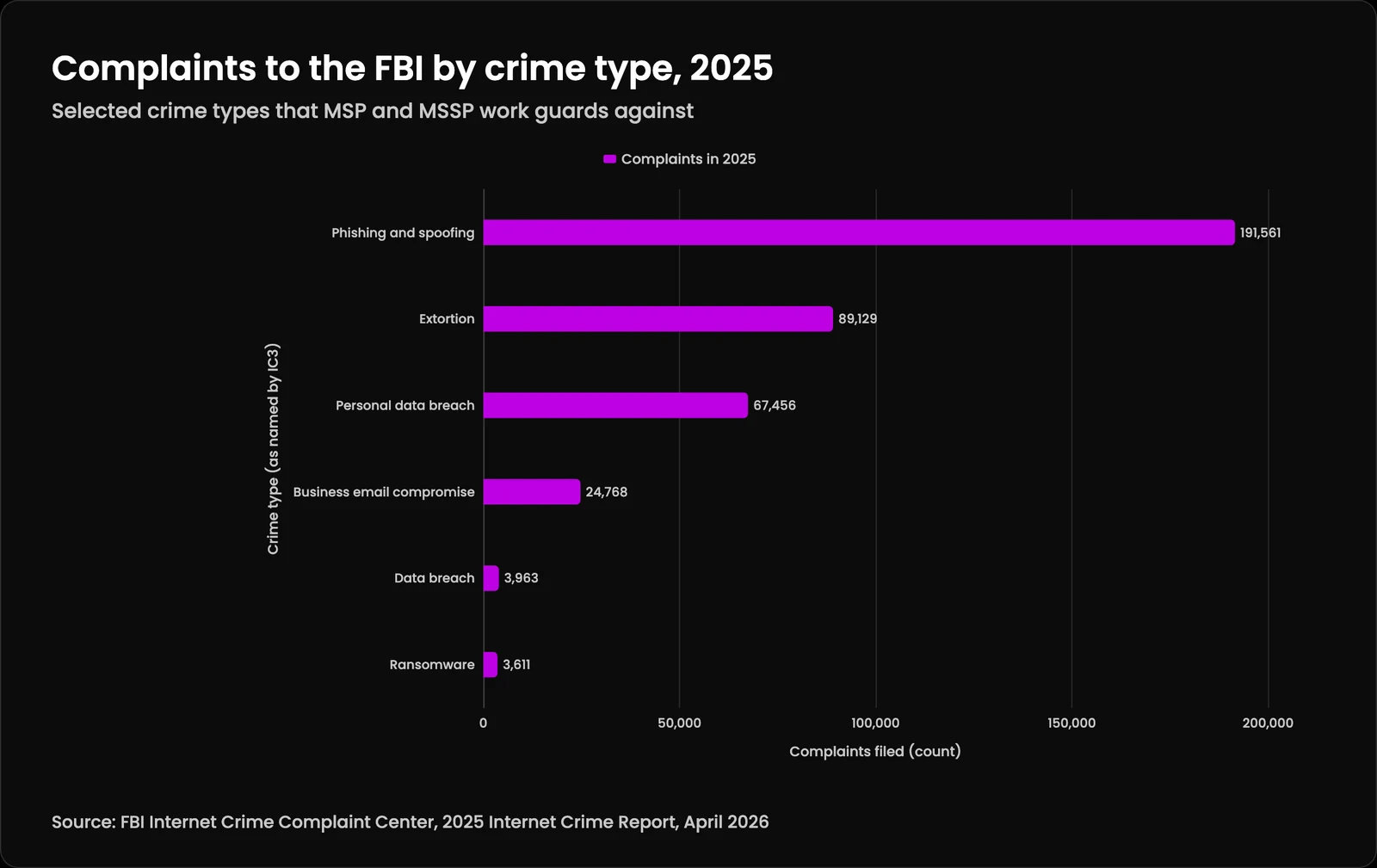
They protect against the everyday ways businesses lose money and data: tricked staff, stolen accounts, exposed records and locked systems. The FBI Internet Crime Report 2025 counted 1,008,597 complaints in 2025. Phishing and spoofing led with 191,561 complaints, followed by extortion at 89,129, personal data breach at 67,456 and business email compromise at 24,768. Data breach complaints reached 3,963 and ransomware 3,611. These are complaints people chose to file, so they show only what was reported.
Most of these start with an account or a message. That is why good MSP and MSSP services spend so much time on boring controls: multi-factor sign-in, fast removal of departed staff, patched servers, tested backups and alerts that reach a person who knows the system. The same IC3 report shows business email compromise behind 24,768 complaints, a crime that usually needs only one convincing email and one unchecked mailbox rule.
Complaints to the FBI by crime type, 2025: the data
Crime type
Complaints in 2025
Phishing and spoofing
191,561
Extortion
89,129
Personal data breach
67,456
Business email compromise
24,768
Data breach
3,963
Ransomware
3,611
Where does Kief Studio fit?
Kief Studio is a technology studio in Shrewsbury, Massachusetts. Our part of MSP and MSSP services is the systems a business runs online: Linux servers, websites, web applications, domain and email records, Google Workspace and system accounts, backups, and watching your attack surface with a written response path. We run them through managed technology services on LTFI, the system we built and operate for clients, and we watch them through managed security monitoring.
A common split between Kief Studio and an existing IT provider
Area
Kief Studio
Your existing IT provider
Websites and web applications
Build, host, patch, monitor
Usually not covered
Linux servers and backups
Run, harden, test restores
Sometimes, by agreement
Domain, DNS and email records
Watch and keep current
Shared, agree an owner
Google Workspace and system accounts
Admin hygiene and alerts
Shared, agree an owner
Laptops, printers, office help desk
Supported, not our focus
Usually covered
Security alerts on what we host
Triage with a written response path
Informed when it touches them
We are not a round-the-clock help desk for laptops and printers. Windows and Mac computers are supported, but they are not where we lead. Many clients keep the IT provider they already trust for desks and devices, and hire us for the applications and infrastructure that provider does not cover. LTFI runs on dedicated machines, and you never install or maintain it. No shared hosting. Dedicated infrastructure.
What does the work look like from week to week?
Week to week, our MSP and MSSP services are steady and mostly quiet. We take inventory of what runs, where it runs and who can reach it. We harden hosts and applications before they go live and keep them patched. We collect the signals that matter for your systems and correlate them, so one attack shows up as one alert with a next step. We report what changed, what we found and what we fixed in plain language.
Inventory every system, account, domain and dependency, with credentials moved into a vault.
Patch, harden and back up on a schedule, and test that backups restore.
Report in plain language, including what went wrong.
Response times are written into the agreement, sorted by severity, through our SLAs and response times. 3am is a retainer, not a default: if after-hours response is in your contract, we pick up, and if it is not, we say so plainly. Four times a year we review the work with you in a quarterly business review and agree what comes next.
What should a contract for MSP and MSSP services say?
It should say who does each task, how fast they respond, how you are told about incidents and how you leave. A joint advisory from CISA, the FBI, the NSA and partner agencies, Protecting Against Cyber Threats to Managed Service Providers and their Customers, warns that providers hold trusted, privileged access to many customers at once. It tells customers to make their contracts require the provider's security controls, multi-factor sign-in on every provider account, and a clear statement of how and when the provider will report an incident.
Contract terms to ask for, and why
Term
What to ask for
Why it matters
Scope by system
A list of every system and task covered
Gaps hide in work nobody listed
Response times
Targets by severity, after-hours terms in writing
A vague promise is not a plan
Incident notice
How and when you are told
You may have duties to customers
Provider access
Multi-factor sign-in, least privilege, named accounts
Provider accounts reach many clients
Logs
What is kept, where, and for how long
Investigations need history
Exit
Return of domains, code, logins and records
Leaving should not mean losing access
The same advisory asks customers to keep their most important logs for at least six months, to limit provider accounts to the systems the provider manages, and to switch those accounts off when the contract ends. We add three plain questions: who owns the domain, the code and the admin logins, and how fast you get them back. Our guide on how to choose an MSP turns these into a checklist, and Amelia S. Gagne covers how to evaluate a managed service provider from the buyer's side.
Which rules shape managed security for a Massachusetts business?
Three sets of rules come up most often, and all of them reach whoever provides your MSP and MSSP services. The Massachusetts data security regulation, 201 CMR 17, asks businesses holding residents' personal information to select service providers able to protect it and to require those measures by contract. The state's own 201 CMR 17.00 compliance checklist also asks for monitoring that alerts you to unauthorized use, and for a review of security measures at least annually.
Healthcare is stricter about vendors. HHS guidance on HIPAA and cloud computing says a provider that stores electronic protected health information for you is a business associate, even if it cannot read the encrypted data, and needs a business associate agreement. For financial firms, the FTC notes in its Safeguards Rule guide that if a service provider runs your security program, the buck still stops with you. See our HIPAA compliance consulting page for how we help.
Do you work with businesses in Worcester County?
Yes. Kief Studio is based in Shrewsbury and works with businesses across Worcester County, the rest of Massachusetts and beyond. Local matters most for in-person discovery, whiteboard planning and the trust that comes from meeting the people who run your systems. The FBI's 2025 complaints by state put Massachusetts 13th, with 22,936 complaints filed by residents and businesses in the state.
How do you choose a provider for MSP and MSSP services?
Choose on scope, response and exit. A feature list tells you little about any of them. Ask each provider to name the systems they will cover, the alerts they will act on, who decides during an incident and how you leave. Then ask how they protect their own access to you, because a provider's admin accounts are a direct path into every client they serve.
Which of my systems will you cover, by name?
Who receives an alert at night, and what are they allowed to do?
How will you tell us about an incident, and how fast?
Who owns the domain, the code and the admin logins?
How do you secure your own accounts that reach our systems?
What drives the cost of the service? Our page on managed IT cost drivers explains the usual ones.
The NIST Cybersecurity Framework 2.0 gives a neutral way to compare answers. It groups security outcomes into six functions: Govern, Identify, Protect, Detect, Respond and Recover, and it treats supply chain risk, including your providers, as part of governance. A provider that can show where its work lands across those six functions is easier to judge than one that only lists tools.
How is AI changing managed security work?
AI now helps sort and summarize alerts, but the decisions that can hurt a business still need a person. On ltfi.ai we describe where the line sits in an AI SOC: agents can triage, enrich and summarize, while containment, lockouts and deleting data wait for a person to approve them. LTFI, the system we run client work on, keeps approvals and an audit log for the same reason.
AI agents are also new things to protect. An agent that can read private data, take in untrusted input and send messages out carries a risk that ordinary software does not. Qurtoo's AI agent security checklist is a short way to check one before you turn it on, and it is worth asking any provider how they watch the agents they run for you.
Are you an MSP or MSSP looking for a partner?
Yes, we work with MSPs and MSSPs as well as the businesses that buy MSP and MSSP services from them. The goal is the same either way: keep people safe. Some partners introduce a client who needs custom builds or hosting and earn a referral fee. Others buy builds, hosting and website operations at a partner discount, set their own price, own the client relationship, and we deliver unbranded behind them. Details are on our partner program for MSPs and MSSPs.
We also share the tooling we built. LTFI, the system that runs client work for us, is offered to MSPs and agencies on LTFI for MSPs and agencies, and our white-label development page covers build work under your name. A referral is an introduction, not an endorsement, and the fee is disclosed to the client.
What happens after you get in touch?
We start by listening. The first conversation is free, and we will tell you plainly if we are not the right fit, or if your current provider already covers what you need. If we do work together, the first stage is technology onboarding: we collect access securely, move credentials into a vault, take inventory of systems, accounts, domains and vendors, and fix urgent risks first.
From there we agree priorities in writing and set the cadence for reports and reviews. Founded 2022. Operating together since 2012. 13+ year client relationships. Security is a byproduct of good engineering, so hardening, patching and monitoring are part of running the system from the first day.
What we do
Take inventory of every system, account, domain and dependency.
Run and harden what we host on dedicated infrastructure with managed hosting on LTFI.
Watch the signals that matter and act on them with a written response path.
Report in plain language and review the work with you every quarter.
Who it is for
Businesses that run their own websites, applications and servers, hold customer data, and want MSP and MSSP services from one accountable team that works beside the IT provider they already have.
When to look elsewhere
A round-the-clock help desk for laptops and printers, or security promises without a written agreement behind them.
What we can stand behind
Founded 2022. Operating together since 2012.
No shared hosting. Dedicated infrastructure.
Security is a byproduct of good engineering.
MSP and MSSP services: common questions
What are MSP and MSSP services?
MSP and MSSP services are ongoing outside help for your technology. A managed service provider keeps systems running through updates, backups and account care. A managed security service provider watches those systems for attacks and helps you respond. Many businesses need some of both, and the contract decides who owns each task.
What is an MSP and an MSSP?
An MSP is a managed service provider that takes ongoing responsibility for running your technology. An MSSP is a managed security service provider that takes ongoing responsibility for monitoring it for threats and supporting response. One is measured on things working, the other on noticing and acting on attacks.
Is MSSP the same as MSP?
No. They overlap, but an MSP's main job is keeping systems working and an MSSP's main job is security monitoring and response. Some providers do both. Read the contract rather than the label, because two providers with the same name for their service can cover very different work.
What does MSP stand for?
In business technology, MSP stands for managed service provider: a company that runs part of your technology under an ongoing contract instead of fixing things one call at a time. The same letters mean other things in other fields, which is why search results for MSP can look mixed.
What is an MSP service?
An MSP service is ongoing management of systems you depend on, paid for as a service. It usually covers updates, backups, user accounts, monitoring for outages and planned improvements. The useful question is which systems it covers by name, and what happens after hours.
What are managed security service providers?
Managed security service providers are companies that run security work for you on an ongoing basis. Typical services include log collection, alert triage, threat detection, vulnerability management and support during an incident. Check what the provider may do on its own, such as isolating a system, and what needs your approval first.
Why use managed security services?
Because security work never stops and most businesses cannot staff it alone. Managed security services give you people and tooling that watch your systems, rank what matters and help you respond. They do not replace good basics like multi-factor sign-in, patching and tested backups, which still have to be done.
What is the difference between MSSP and SOC?
An MSSP is a company that sells security services. A SOC, or security operations center, is the team and tooling that watches security signals and handles alerts. Many MSSPs run a SOC to deliver their service, and some businesses run their own SOC or share one with a provider in a co-managed model.
What are managed services in cyber security?
Managed services in cyber security are ongoing security tasks run by an outside provider: monitoring, alert handling, vulnerability management, hardening and incident support. They differ from a one-time assessment because the provider stays responsible over time. Ask for a written list of what is covered and how results are reported to you.
How much does an MSSP cost?
It depends on how many systems are watched, how much log data is collected, what hours are covered and how much response is included. After-hours coverage and hands-on containment cost more than alerting alone. Ask each provider to explain its cost drivers in writing so you can compare like for like.
What is co-managed IT support?
Co-managed IT support is a setup where an outside provider works beside your own IT staff instead of replacing them. Your team keeps context about the business, and the provider adds hours, skills or tools. It works when tasks are split by system and written down, including who decides during an incident.
Do small businesses need cyber security?
Yes. Small businesses hold customer data, pay invoices by email and rely on a handful of accounts, which makes them practical targets. The essentials are multi-factor sign-in, patched systems, tested backups, fast removal of departed staff and someone who reads the alerts. Those basics matter more than any single product.
Who are MSP partners?
MSP partners are companies that work with a managed service provider to deliver more than either could alone, such as a build studio, a security provider or a software maker. Kief Studio partners with MSPs and MSSPs through referrals and unbranded delivery of builds, hosting and website operations.