
Managed IT services cost should match the written scope: the systems covered, the number of users and devices, response and restore targets, after-hours terms and security duties. A fair price is one you can trace to those items line by line. Compare quotes against the same written scope, not by headcount alone.

Managed IT services cost: what drives the price
Managed IT services cost is set mostly by scope: how many people, devices, servers and applications the provider looks after, how fast it must respond and restore service, whether after-hours coverage is included, and how much security and compliance work the business needs. The pricing model, per user, per device, tiered or flat retainer, changes how that cost is billed and who carries the risk of change.
What drives managed IT services cost?
Managed IT services cost follows the work, and the work follows what you run. A provider that looks after twelve laptops and a shared drive is doing a different job from one that hosts a customer portal, a database and three websites, even if both businesses have twelve staff. That is why honest providers ask for an inventory before they give a number, and why two quotes for the same headcount can be far apart.
- Scope: which systems the provider owns, from laptops and email to servers, applications, websites and backups.
- Size: the number of users, devices, servers and locations.
- Complexity: custom applications, old systems, many vendors and undocumented setups take more hours.
- Service levels: response and restore targets by severity, and whether after-hours response is included.
- Security work: monitoring, patching windows, log retention, access reviews and incident handling.
- Compliance: HIPAA, the FTC Safeguards Rule or 201 CMR 17.00 duties add documentation, contracts and evidence.
- Onboarding and cleanup: the one-time work to inventory, document and fix what is already there.
- Pass-through costs: software licenses, hosting and hardware the provider buys on your behalf.
We see the same handful of drivers in almost every quote. The list below is roughly in order of how much each one moves the number for a small or mid-sized business. Most of them are choices you can make, which is the useful part: once you know what drives managed IT services cost, you can decide which drivers are worth paying for.
What are the main managed IT services pricing models?
Most providers use one of five or six models, and many mix two. The model does not change how much work there is; it changes how the bill is calculated and who absorbs the cost when the work grows. Per user and per device are the most common for office IT. Flat retainers for a defined scope are common for hosting, applications and websites.
| Model | How it bills | Fits best when | Watch for |
|---|---|---|---|
| Per user | A set amount for each person supported | Work scales with headcount; staff use several devices | Which users count, and whether servers and applications are extra |
| Per device | A set amount per laptop, server or network device | Few staff, many machines, or shared workstations | Servers and applications priced very differently from laptops |
| Tiered bundles | Packages with more services at each level | Needs match one tier closely | Paying for a tier to get one feature you need |
| Flat retainer for a defined scope | One recurring fee for a written list of systems and tasks | Systems matter more than headcount: hosting, apps, websites | What happens when the scope changes |
| Hourly or block time | Hours used, or prepaid blocks | Small, irregular needs, or projects | No incentive to prevent problems; surprise bills |
| Co-managed share | Fee for the provider's share of the work only | You keep an internal IT person | Gaps between what each side owns |
Ask any provider which model it uses and why. A good answer ties the model to how your costs actually behave: per user suits a business whose work scales with headcount, while a flat scope suits one whose systems matter more than its staff count.
How do scope and size change managed IT services cost?
Scope is the largest driver because it decides how many hours a month the provider must spend to keep everything healthy. A laptop needs patching and occasional help. A server running a customer application needs patching, hardening, monitoring, backups, restore tests, capacity planning and someone who knows how the application behaves. The second takes far more skilled time per item.
| Driver | Pushes cost up | Pushes cost down |
|---|---|---|
| Systems in scope | Custom apps, databases, many websites, old servers | Fewer systems, retired tools, standard software |
| Documentation | Passwords in spreadsheets, nobody knows what runs where | A current inventory and credentials in a vault |
| Vendors | Many vendors with overlapping jobs | Fewer vendors with clear roles |
| Service levels | Fast restore targets and after-hours response | Business-hours response for non-critical systems |
| Security and compliance | Regulated data, long log retention, audits | Less sensitive data, clear policies already in place |
| Change rate | Frequent hires, moves and new projects | Stable staff and systems |
| Hosting | Shared hosting that needs constant firefighting | Dedicated infrastructure that is patched and watched |
Size works on top of scope, but not in a straight line. The first fifty devices of the same make and setup are cheaper to manage per device than ten devices that are all different. Standard builds, fewer vendors and current documentation lower the per-item effort, which is why a cleanup during onboarding often pays for itself.
Why do response times and after-hours coverage change the price?
Service levels are one of the biggest levers on managed IT services cost. Faster response and restore targets cost more because someone has to be ready to act within that window, every time. A one-hour restore target for your main system means staff, tooling and runbooks prepared in advance. After-hours response means a person available at night and on weekends, which is a real cost the provider either charges for or quietly does not provide.
We put it this way: 3am is a retainer, not a default. Our written SLAs set severity levels with response and restore targets, and after-hours terms go into the agreement only when the business needs them. Our page on SLA response times explains the difference between response and restore, and our comparison of RTO and RPO helps you decide how fast each system really has to come back.
How do security and compliance requirements affect managed IT services cost?
Security and compliance add work that has to be done and recorded, so they add cost. Monitoring alerts, reviewing access, keeping logs for a set period, testing restores and producing evidence for an auditor all take skilled hours. Laws also add contract work: in Massachusetts, 201 CMR 17.00 requires businesses holding residents' personal information to require appropriate security measures from service providers by contract.
Healthcare and finance add more. HHS guidance on HIPAA and cloud computing says a provider that creates, receives, maintains or transmits electronic protected health information for you is a business associate and needs a business associate agreement. The FTC Safeguards Rule, 16 CFR 314.4(f), requires covered businesses to periodically assess their service providers. A provider that takes on those duties properly has to price the time to do them.
This is one cost not to cut. Security is a byproduct of good engineering, so on what we host, hardening, patching and monitoring are part of running the system, not a separate line; our managed security monitoring page describes that work.
What does an in-house IT hire cost to compare against?
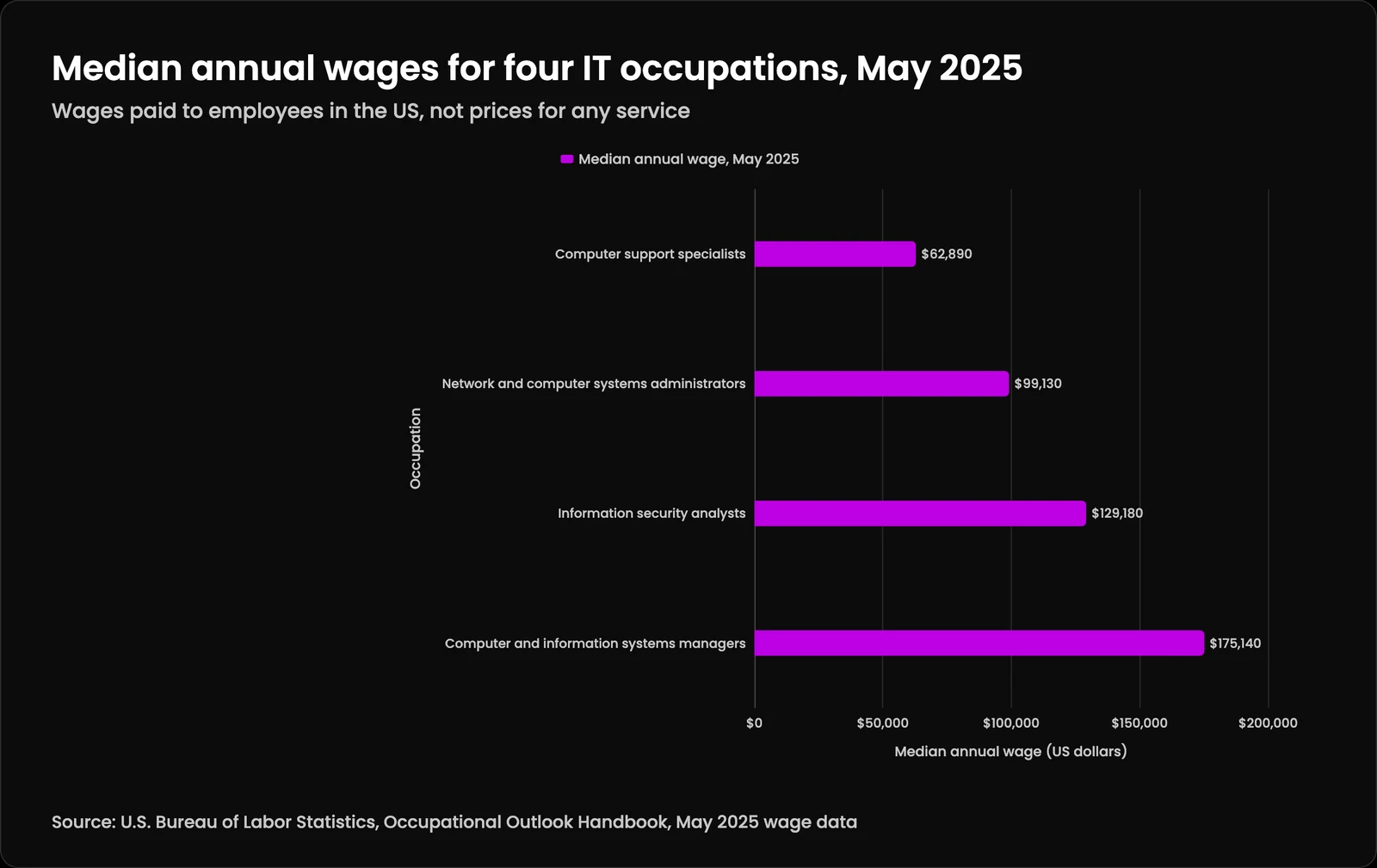
The usual comparison for managed IT services cost is a salaried IT person, and government wage data gives a fair baseline for that side. These are wages paid to employees, not prices for anyone's services. In the BLS Occupational Outlook Handbook, median annual wages in May 2025 were $62,890 for computer support specialists, $99,130 for network and computer systems administrators, $129,180 for information security analysts and $175,140 for computer and information systems managers.
Comparing a quote with one salary understates the in-house side twice: the wage leaves out benefits, and one person covers one specialty. The chart shows how far apart the four roles a small business most often needs are, and a single generalist hire usually sits at the left end of it.
| Occupation | Median annual wage, May 2025 |
|---|---|
| Computer support specialists | $62,890 |
| Network and computer systems administrators | $99,130 |
| Information security analysts | $129,180 |
| Computer and information systems managers | $175,140 |
What does an employee cost beyond wages?
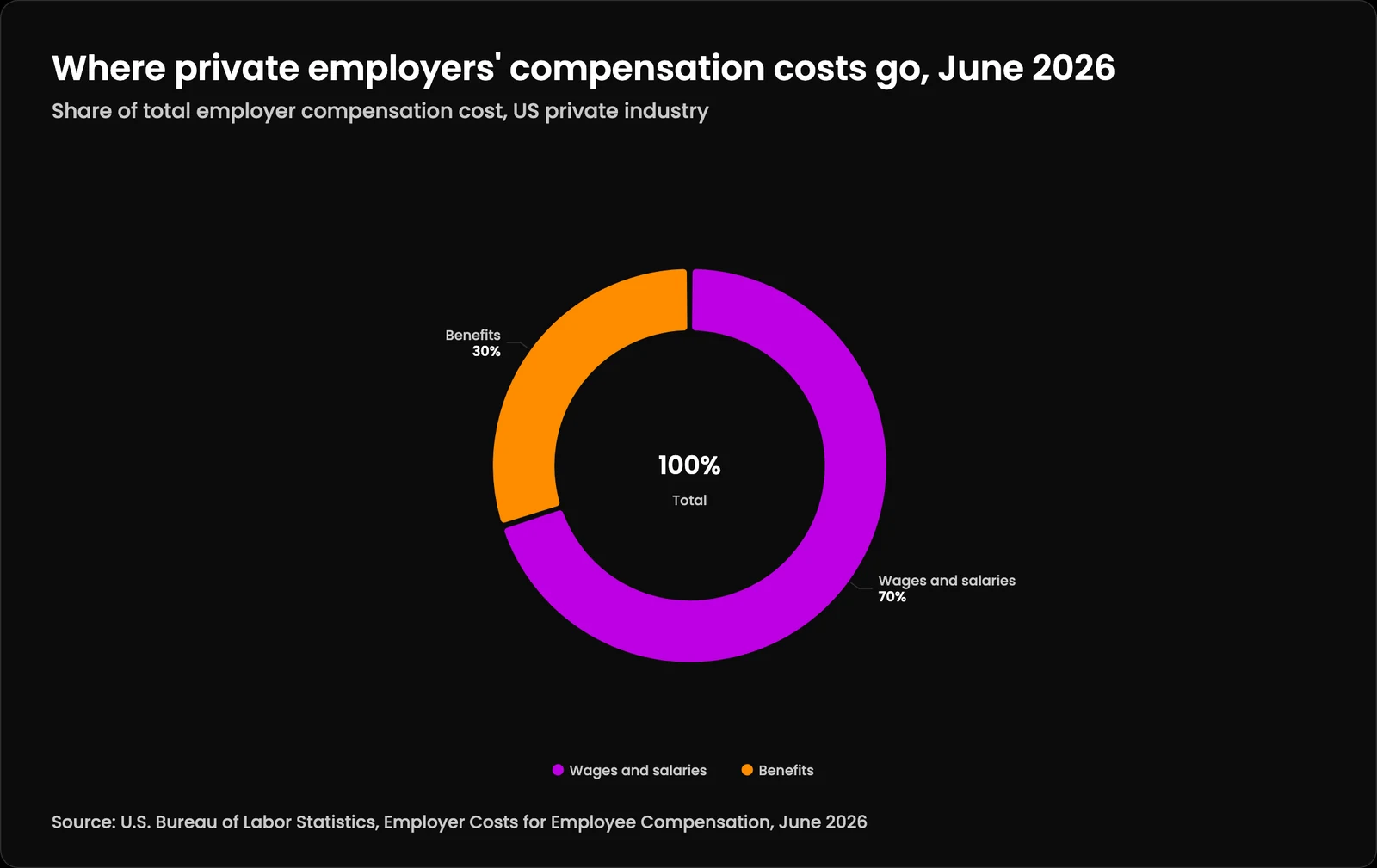
Wages are not the whole cost of an employee. The BLS Employer Costs for Employee Compensation release for June 2026 found that for private industry workers, wages and salaries accounted for 70.0 percent of employer costs and benefits for the remaining 30.0 percent. So the loaded cost of a hire is well above the wage line.
The bigger point is coverage. One person cannot be a support specialist, a systems administrator and a security analyst at once, and cannot cover their own vacation. Brian S. Gagne's analysis of managed IT cost per user versus an IT hire works through the break-even math with BLS and Massachusetts figures. Many businesses end up with both, in a co-managed arrangement.
| Cost component | Share of employer compensation cost |
|---|---|
| Wages and salaries | 70% |
| Benefits | 30% |
What costs do managed IT quotes often leave out?
The monthly fee is rarely the whole of managed IT services cost. Ask about one-time onboarding, projects, licenses and anything billed by the hour outside the agreement. A quote that looks low because it leaves these out is not cheaper; it moves the cost to later, when you have fewer options.
- Onboarding and discovery, and any cleanup found during it.
- Projects: migrations, new builds, office moves and major upgrades.
- Software licenses, cloud and hosting fees passed through, with or without markup.
- Hardware purchases and replacements.
- After-hours work when it is not in the agreement.
- Work outside the written scope, billed hourly.
- Handover and exit work if you leave.
Coordination is a cost too. When four vendors each own a slice and nobody owns the gaps, your staff spend hours relaying messages between them. Amelia S. Gagne's piece on one vendor versus four and the coordination cost shows how to measure that before believing any consolidation claim. Hosting is another: LTFI's analysis of why shared hosting hides its cost until a breach compares twelve months of total cost, and our shared vs managed hosting comparison covers the same choice.
How do you compare two managed IT quotes fairly?
The fair way to compare managed IT services cost is to make every provider price the same written scope. Send one page listing your systems, users, devices, service levels and compliance needs, and ask each one to quote against it line by line. Then compare what is included before you compare totals; the cheaper quote is often the one with fewer systems in scope or no restore targets.
- Same scope: every quote prices the same list of systems and tasks.
- Same service levels: response and restore targets per severity, and after-hours terms.
- Same security duties: patch windows, monitoring, logging, backups and restore tests.
- One-time costs listed separately from monthly costs.
- Pass-through costs shown with any markup.
- Exit terms and handover included in the comparison, not left for later.
Normalize the model too. If one quote is per user and another is a flat retainer, convert both to a monthly total for your actual setup today and for the setup you expect in a year. Our guide on how to choose an MSP has the questions to send with the scope, and NIST Cybersecurity Framework 2.0 (GV.SC-05) is a useful reminder that security requirements belong in the contract you are pricing, not in a later add-on.
How can you lower managed IT services cost without cutting safety?
Lower the work instead of the care. Retire systems nobody uses, standardize devices, consolidate overlapping vendors, and keep documentation current, so each hour the provider spends goes further. Those steps reduce managed IT services cost because they reduce effort, not because anyone skips a patch.
Match service levels to what each system is worth. Your customer-facing application may need a fast restore target; an internal wiki may not. Setting severity per system, and reviewing it every quarter, keeps you from paying top-tier coverage for everything. Our quarterly business reviews are where we look at that with clients, and our note on why enterprise quality does not require an enterprise invoice lists what small business IT should include either way.
Why don't we publish a price for managed IT services?
Because managed IT services cost depends on what you run, and a number before we have seen it would be a guess. We start with an inventory during onboarding: every system, account, domain and vendor, with credentials moved into a vault. The scope we write from that inventory is what we price.
Our managed technology services cover what a business runs online: websites, applications, Linux servers, hosting on dedicated machines, backups, domain and email records, and security monitoring on what we host. We are not a laptop help desk; if you have a good provider for that, keep them. We are in Shrewsbury, Massachusetts, and work across Worcester County and beyond. For how the MSP and MSSP roles fit together, see the MSP and MSSP services hub and our comparison of MSP vs MSSP.
Also read
Managed IT services cost: what drives the price: questions people ask
How much should managed IT services cost?
How much do managed IT services typically cost?
There is no public price list, and quotes vary widely because scope varies. The biggest factors are which systems are covered, how fast problems must be fixed, after-hours coverage, and compliance work. Ask several providers to price the same written scope so the differences are visible.How much does a managed service provider charge?
It depends on the pricing model and the scope. Providers charge per user, per device, by tier, as a flat retainer for a defined list of systems, or by the hour. Ask what is included, what is billed separately, and how the price changes when you add people or systems.What is the pricing model for managed services?
The common pricing models are per user, per device, tiered bundles, a flat retainer for a defined scope, hourly or block time, and a co-managed fee for the provider's share of the work. Many providers combine a monthly model with separate project pricing.What are the three standard MSP pricing models?
The three most often cited are per user, per device and tiered packages. In practice, flat retainers for a defined scope and hourly or block time are also common, especially for hosting, applications and projects. The model matters less than how clearly the scope is written.How much does MSP cost per month?
Monthly cost depends on the number of users, devices and servers, the systems in scope, service levels and security duties. Per-user and per-device models scale with your size; a flat retainer scales with your systems. Ask for the monthly total for your actual setup today and a year from now.What is the average cost of IT per employee?
It varies by industry, systems and regulation, so averages mislead. For the in-house side, BLS reported median annual wages of $62,890 for computer support specialists in May 2025, and benefits add about 30 percent of employer compensation costs on top of wages in private industry.How much is IT support for a small business?
For a small business, IT support cost depends on how many people and devices you have, if you host your own applications or websites, and how fast you need help. A business with a customer portal needs more than one with only email and laptops, even at the same size.What is an MSP model?
An MSP model is a way of running IT where an outside managed service provider looks after part or all of your technology for a recurring fee, under written service levels, instead of billing only when something breaks. It can be fully managed or co-managed with your own staff.What is MSP in pricing?
In IT, MSP pricing means how a managed service provider bills for ongoing work: per user, per device, by tier, as a flat retainer or by the hour. The abbreviation has unrelated meanings in other industries, so check the context of anything you read about MSP prices.What is the average cost of software maintenance?
Software maintenance cost depends on how much the software changes, how many systems it connects to, how old it is, and how fast fixes are needed. Custom applications need patching, dependency updates, monitoring and backups. Ask for maintenance to be scoped and priced separately from new features.What is the average cost of IT services?
There is no reliable single average, because a business with email and laptops buys a different service from one that hosts customer applications. Compare providers on the same written scope instead. For staff costs, BLS publishes median wages for IT occupations, which give a fair in-house baseline.
Keep reading
More in Support
- Managed Services
You run your business. We keep the technology running.
- Quarterly Business Review
Strategic check-ins, not status calls.
- Strategic Advisory
Technology decisions that make business sense, not just technical sense.