
Co-managed IT services are a shared arrangement where your internal IT staff and an outside managed service provider each own named parts of your technology. Your team keeps local, people-facing work; the provider adds specialist skills, tooling and coverage. The split is written down task by task in the agreement.

Co-managed IT services: what stays with your team
Co-managed IT services are an arrangement where your own IT staff and an outside managed service provider share the work, each owning named tasks and systems. Your team keeps what needs local knowledge and fast hands; the provider adds specialist skills, tooling and coverage. It works when the split is written down task by task, with one owner per task and clear authority during an incident.
What are co-managed IT services?
Co-managed IT services are a shared model: an internal IT person or team keeps running part of your technology, and a managed service provider (MSP) runs the rest under a contract. The internal side usually keeps the people work, such as onboarding staff, fixing a printer before a client meeting, and knowing which vendor gets called when the phones go down. The provider usually takes the specialist and repetitive work: monitoring, patching servers, backups, security tooling and projects that need skills the internal team does not have.
Fully managed IT is different. There, the provider runs the whole function, and the business may have nobody technical on staff. Co-managed IT services start from the opposite assumption: you already have someone good, and you want to keep them. The goal is to stop asking your in-house IT staff to be the help desk, the network engineer, the security analyst and the backup operator at the same time.
The word that matters is "named." A co-managed arrangement where both sides "help with security" or "share the servers" is how work gets dropped. Each task needs exactly one owner, and that owner needs the access and the authority to finish it.
How do co-managed IT services work day to day?
Day to day, co-managed IT services run on three shared things: one ticket or request queue both sides can see, one documented list of who owns which task, and one set of runbooks for the work that crosses between teams. Requests land in the queue, the owner picks them up, and anything that needs the other side is handed off with notes, not a hallway conversation.
A normal week might look like this. Your IT manager handles a new hire, a laptop swap and a question about a shared drive. The provider applies server and application patches in an agreed window, checks that last night's backups finished, reviews security alerts and reports anything that needs a decision. On Thursday the two sides meet for twenty minutes to look at what changed, what is stuck and what is coming.
Writing the shared runbooks is usually the slowest part. A practical way to start is to record the person who knows the job explaining it, then turn that into a checklist; Qurtoo's guide on turning how you work into a checklist walks through that method without pasting passwords or customer data into an AI tool.
What stays with your team, and what goes to the provider?
Keep the work that depends on knowing your people, your office and your history. Hand off the work that depends on specialist skill, round-the-clock tooling or volume. The table below is a starting split we see work for small and mid-sized businesses; every business moves a few rows, and that is the point of writing it down.
| Area | Usually stays with your team | Usually goes to the provider |
|---|---|---|
| People and devices | New hires, departures, laptop setup, the person who walks over to help | Device patching policy, standard builds, reporting on what is out of date |
| Servers and hosting | Knowing what each system is for and who depends on it | Patching, hardening, monitoring, capacity and uptime |
| Websites and applications | Content owners, business rules, who approves changes | Hosting, updates, security fixes, performance and backups |
| Backups and recovery | Deciding what must come back first and how fast | Running backups, testing restores, reporting results |
| Security monitoring | Approving actions that affect staff, such as locking an account | Watching alerts, triage, escalation and the written incident record |
| Accounts and access | Approving who gets access to what | Running the identity system, removing stale accounts, MFA enforcement |
| Domain and email records | Knowing which vendors send mail as the business | DNS, SPF, DKIM and DMARC records, certificate renewals |
| Vendors and projects | Relationships with line-of-business vendors | Technical projects such as migrations and new builds |
| Planning | Budget, priorities and sign-off | A written roadmap and a quarterly review of what changed |
Two rows cause most arguments: administrator access and vendor management. Decide them first. If the provider needs administrator rights to do its job, those accounts should be separate, named and logged, never shared with your staff. If your team manages a vendor, such as the phone system or the line-of-business software, the provider needs to know who to call and when it is allowed to call them.
Co-managed vs fully managed IT vs staff augmentation: what is the difference?
The difference is who owns the outcome. In fully managed IT, the provider owns the whole function. In co-managed IT services, ownership is split by task. In staff augmentation, you rent a person's hours and keep all the ownership yourself. Most confusion comes from buying one and expecting another.
| Fully managed IT | Co-managed IT | Staff augmentation | |
|---|---|---|---|
| Who owns results | The provider, for everything in scope | Split by task, one owner per task | You do; the contractor follows direction |
| Your internal IT staff | Often none | One or more, kept and supported | Yes, directing the extra people |
| Typical length | Ongoing | Ongoing | A project or a fixed term |
| Tooling | The provider's | Shared or the provider's, agreed in writing | Yours |
| Where it fails | The provider does not know your business | Gaps between the two sides | Nobody owns the result after the contract ends |
Staff augmentation suits a project with an end date, such as a migration, where you need hands and will direct them. Co-managed IT services suit ongoing work where you want a provider accountable for results on its share, not just present. Fully managed suits a business with no technical staff at all. Our managed services overview covers the fully managed side in more depth.
Who are co-managed IT services a good fit for?
Co-managed IT services fit a business that already has one to a few capable IT people and keeps asking them to cover more specialties than one person can. The common signs: security alerts nobody has time to read, patching that slips every month, a backup nobody has tested, and an IT manager who cannot take a week off.
The skills market explains part of the squeeze. The U.S. Bureau of Labor Statistics Occupational Outlook Handbook projects employment of information security analysts to grow 21% from 2025 to 2035, much faster than average, while it projects a change of -4% for network and computer systems administrators and -3% for computer support specialists. Security is where demand is moving, and it is the specialty a small internal team is least likely to have in house.
It is a poor fit when there is nobody internal at all (choose fully managed), or when the internal team sees the provider as a threat to their job. That second problem is real and worth naming early: the arrangement should take work off your IT person's plate, not take their authority away.
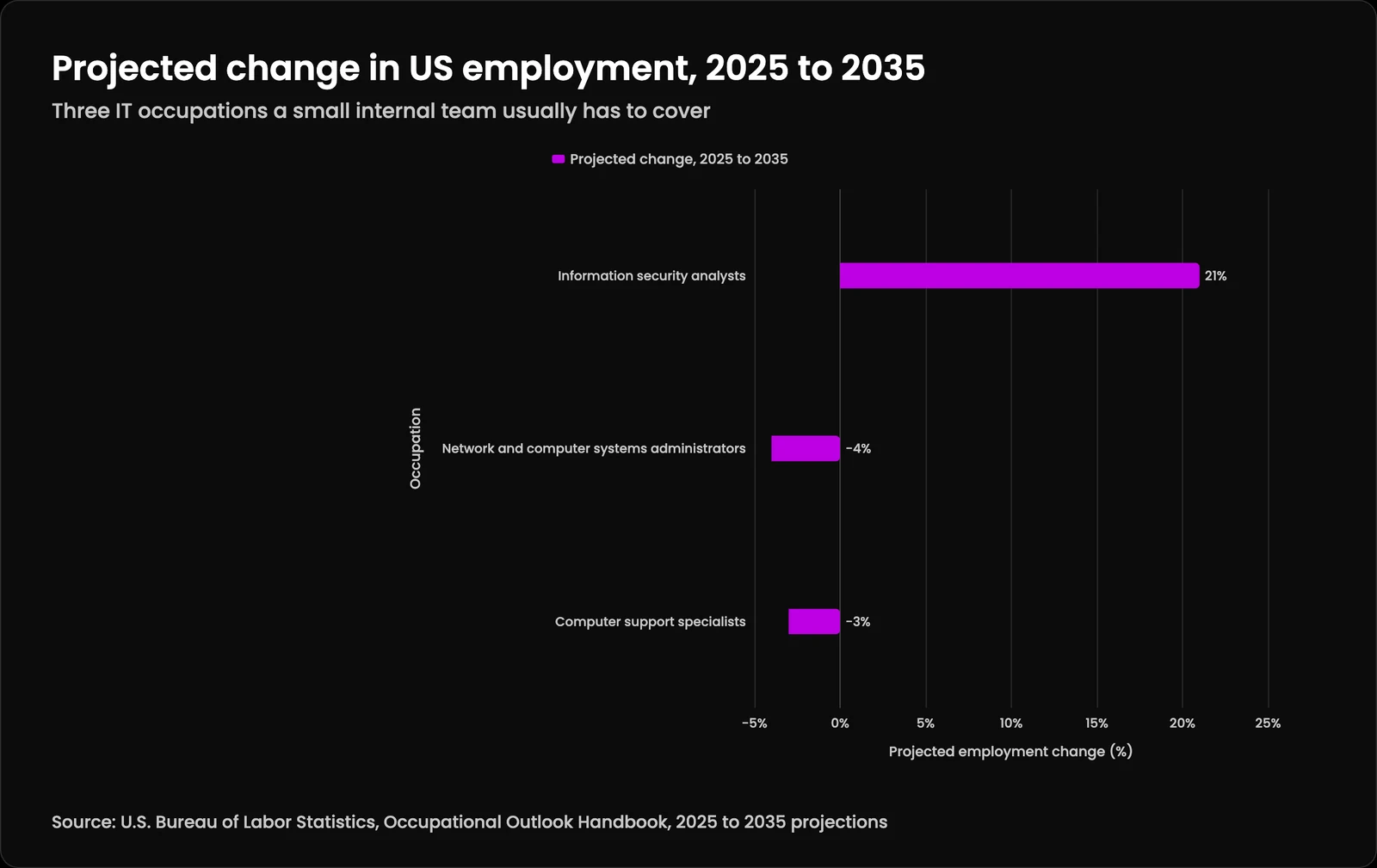
| Occupation | Projected change, 2025 to 2035 |
|---|---|
| Information security analysts | 21% |
| Network and computer systems administrators | -4% |
| Computer support specialists | -3% |
How do you write a co-managed IT responsibility matrix?
A responsibility matrix is a table with every recurring task as a row and the two teams as columns, marking who is responsible for doing it and who is accountable for the result. The common format is RACI: responsible, accountable, consulted, informed. Its one firm rule is a single accountable owner per task.
- List every system: servers, websites, applications, domains, email, backups, accounts and the vendors behind them.
- List the recurring tasks for each system, including the boring ones: patching, restore tests, certificate renewals, access reviews.
- Give each task one accountable owner and note who must be consulted before a change.
- Write down the access each owner needs, and nothing more.
- Agree how work crosses between teams: the queue, the handoff note, and the hours each side covers.
- Review the matrix every quarter and after every incident, because the business changes.
Build it from real work, not from a template. Pull the last three months of requests and alerts, group them, and give each group an owner. Then add the tasks that never show up as requests because nobody does them, such as restore tests and removing old accounts.
How should access and security work when two teams share the keys?
Treat the provider's access as a privileged door into your business and manage it that way. The joint advisory CISA AA22-131A, published May 11, 2022 by the US, UK, Australian, Canadian and New Zealand cybersecurity authorities, tells MSP customers to require multifactor authentication on all MSP accounts, apply least privilege in both the provider's and the customer's environments, keep MSP accounts out of internal administrator groups, and disable MSP accounts that are no longer managing infrastructure.
The same advisory says the contract should specify "whether the MSP or the customer owns specific responsibilities." That sentence is the whole case for a written split. NIST Cybersecurity Framework 2.0 makes the same point in its governance outcomes: GV.SC-02 calls for cybersecurity roles and responsibilities for suppliers, customers and partners to be established, communicated and coordinated internally and externally.
If you hold personal information about Massachusetts residents, the state rule adds a duty. 201 CMR 17.00 requires a written information security program that oversees service providers, by selecting ones capable of appropriate security measures and requiring them by contract to implement and maintain those measures. A provider of co-managed IT services is a service provider under that rule, so its duties belong in the agreement.
Who makes the call during an incident?
Decide before anything goes wrong who may isolate a server, lock an account or take a website offline, and how fast they can be reached. With co-managed IT services, the provider often sees the alert first, but your team may hold the authority to act on anything that affects staff or customers. The gap between seeing and deciding is where damage grows.
Write the authority path into the agreement: what the provider may do on its own, what needs a call to your IT lead, and who is next if that person does not answer. NIST CSF 2.0 lists this under GV.SC-08, which says relevant suppliers and other third parties are included in incident planning, response and recovery activities. Our incident response guide covers the plan itself, and our comparison of an MSSP and a co-managed SOC looks at the same question for security monitoring.
Amelia S. Gagne's piece on co-managed IT without splitting accountability goes deeper on incident authority and on keeping access proportionate in the first year. A good test before you sign: walk through one realistic alert on paper, such as a server showing signs of compromise at two in the morning on a Saturday, and name who sees it, who decides, and how they are reached.
What should a co-managed IT services agreement say?
The agreement should turn the responsibility matrix into obligations: what each side does, how fast, with what access, and what happens when the relationship ends. If a task is not in the contract, assume nobody owns it. Keep the matrix as a versioned schedule to the agreement, so a change to the split is a signed change and not an email both sides remember differently.
- The responsibility matrix, attached as a schedule and versioned.
- Severity levels, with response and restore targets for each, and after-hours terms if you need them.
- Named accounts for the provider, MFA on all of them, and how access is reviewed and removed.
- How and when the provider notifies you of a suspected or confirmed security event.
- Backups: what is backed up, how often restores are tested, and who sees the results.
- Who owns the documentation, passwords and configurations the provider creates.
- Exit terms: how long the handover takes, what is returned, and when access is removed. NIST CSF 2.0 GV.SC-10 asks for plans that cover what happens after a service agreement ends.
Response times need care. A promise to respond in an hour is not a promise to fix anything in an hour, so ask for both response and restore targets by severity; our page on SLA response times explains the difference. When you compare providers, our guide on how to choose an MSP lists the questions to ask before you sign.
Where does Kief Studio fit in co-managed IT services?
We are usually the provider side of a co-managed arrangement for the systems a business runs online. Your IT person or your current IT provider keeps laptops, office software and the help desk. We take the websites, applications, Linux servers, hosting, backups, domain and email records, and security monitoring on what we host, through managed technology services and managed security monitoring.
That split exists because those systems are often the part nobody owns: the internal team is busy with people and devices, and the office IT provider does not build or host applications. We host on dedicated machines with managed hosting on LTFI, the system we built and operate; LTFI's Watch layer describes the monitoring and patching on those servers. Our onboarding starts with an inventory and moves shared passwords into a vault, and written SLAs set response times we can keep. 3am is a retainer, not a default.
We are based in Shrewsbury, Massachusetts, and work with businesses across Worcester County and the rest of the state. For how the MSP and MSSP roles divide in general, see our MSP and MSSP services hub and the plain comparison of MSP vs MSSP.
What happens if the co-managed arrangement ends?
Plan the exit on day one, because a provider that holds your only copy of the passwords and diagrams holds the business. Every account, configuration and runbook the provider creates should live in systems you own, and the agreement should name a handover period.
A clean exit has three parts: your team or the next provider gets working access to everything, the old provider's accounts are removed and confirmed removed, and the documentation is current on the day it changes hands. Brian S. Gagne's guide to switching managed IT providers walks through the order, and our note on switching IT providers without losing access covers the logins that most often go missing. Knowing who owns the website and its logins before you sign saves the hardest conversation later.
Also read
Co-managed IT services: what stays with your team: questions people ask
What are co-managed IT services?
What does co-managed mean?
Co-managed means two parties run something together, each responsible for a defined part. In IT, co-managed IT services mean your own staff and an outside provider share the work under a written split, rather than the provider taking over everything or simply lending people by the hour.What is co-managed IT support?
Co-managed IT support is help from an outside provider that works beside your internal IT person instead of replacing them. The provider usually takes monitoring, patching, backups and security tooling, while your staff handle users, devices and local vendors. In most co-managed IT services, both sides share one request queue.What is the difference between staff augmentation and managed services?
Staff augmentation rents you a person's time, and you direct the work and own the result. Managed services, including co-managed arrangements, make the provider accountable for outcomes on its share of the work, measured against written service levels. Augmentation suits projects; managed services suit ongoing operations.What is the difference between MSP and MSSP?
An MSP, or managed service provider, keeps your technology running: patching, backups, monitoring and support. An MSSP, or managed security service provider, focuses on security monitoring and response. Many co-managed IT services include both kinds of work, so the split should say who owns each.Can you provide an example of a responsibility matrix?
A simple one lists tasks as rows and the two teams as columns. For example: server patching, provider accountable; new hire accounts, internal team accountable; restore tests, provider responsible and internal team informed; locking a staff account during an incident, internal team accountable with the provider consulted.How to prepare a responsibility matrix?
Start from real work. Pull three months of requests and alerts, group them into recurring tasks, then add tasks nobody does today, such as restore tests. Give each one a single accountable owner, note who is consulted, write the access each owner needs, and review it quarterly.What is the golden rule of RACI?
Each task has exactly one accountable person. Several people can be responsible for doing parts of the work, consulted or informed, but only one is answerable for the result. In co-managed IT services, breaking this rule is the most common reason tasks fall between the two teams.How do co-managed services improve IT governance and accountability?
They improve it when the split is written down. A named owner for every task, logged provider accounts and a quarterly review give leadership a clear record of who did what. NIST CSF 2.0 asks for exactly this: roles and responsibilities for suppliers established and coordinated.What is the pricing model for managed services?
Common models are per user, per device, tiered bundles, a flat monthly retainer for a defined scope, and hourly or block time for projects. Co-managed IT services are often priced on the provider's share of the work only. What drives the number is scope, systems, response times and security needs.What are the different types of managed IT services?
The main types are monitoring and maintenance, help desk support, managed security, backup and recovery, cloud and hosting management, network management, and strategic planning. Co-managed IT services pick some of these for the provider and leaves the rest with your team.Do small businesses need cyber security?
Yes. Small businesses hold customer data, bank access and email accounts that attackers target. In Massachusetts, 201 CMR 17.00 requires a written security program from any business that holds residents' personal information, including oversight of service providers. Size changes the scale of the program, not the need for one.What does MSP stand for in the IT industry?
MSP stands for managed service provider: a company that runs part or all of another business's technology under an ongoing contract, usually with written service levels. In co-managed IT services, the MSP is the outside half of the team, working beside your own IT staff.
Keep reading
More in Support
- Managed Services
You run your business. We keep the technology running.
- Quarterly Business Review
Strategic check-ins, not status calls.
- Strategic Advisory
Technology decisions that make business sense, not just technical sense.