
A web app is reached through a browser like a website, so people often use the words loosely. The difference is purpose: a website mainly publishes information, while a web app lets each person sign in and work with their own data, such as orders, files, or appointments.

Web app vs website: what is the difference?
The web app vs website difference comes down to what people do there. A website mostly delivers information people read, such as services, hours, and articles. A web application lets people do tasks with their own data, such as booking, ordering, or managing an account, usually after they log in. Both run in a browser, and many businesses need one of each.
Web app vs website: what is the difference?
A website informs; a web app does work. On a website every visitor sees roughly the same pages. On a web application each person sees their own data and changes it: an order, an appointment, a file, a balance. That one difference drives everything else in the web app vs website decision, from how it is built to what it costs and how it is secured.
| Website | Web application | |
|---|---|---|
| Main job | Inform and persuade | Let people complete tasks |
| Content | The same pages for every visitor | Each person's own data |
| Logins | Usually none | Usually required |
| Data | Text and media you publish | Records users create and change |
| Typical examples | Service pages, menus, blogs, portfolios | Portals, booking, ordering, dashboards, internal tools |
| Search engines | Pages are meant to be indexed | Public pages indexed; private screens kept out |
| Security focus | Patching, forms, the publishing login | Access control, authentication, data protection |
| Who builds it | Web designers and developers | Software developers, testers, and designers |
The line between them is gradual. A contact form does not turn a website into an app. A booking flow that checks real availability, takes a deposit, and lets a customer reschedule later does. A useful test is to ask whether the site has to remember who someone is and what they did last time. If it does, you are building an application, whatever it is called.
What is a website?
A website is a set of linked pages, served from a web address, that people read in a browser. Its job is to answer questions and help a visitor decide what to do next: call, visit, buy, or book. The U.S. Bureau of Labor Statistics describes the trade plainly: web developers create and maintain websites.
A modern business website still has moving parts. It may pull articles from a content management system, show a map, or send a form to your inbox. It stays a website as long as those parts serve publishing, not personal accounts. Our web design service covers this kind of site: planned around what customers ask, built for phones first, and kept in your name.
What is a web application?
A web application is software that runs on a server and in the browser, so people can use it without installing anything. The browser shows screens; the server checks who you are, applies the business rules, and stores the data. Email in a browser, online banking, a project tracker, and a customer portal are all web applications.
Most web apps run JavaScript in the browser to update screens without reloading the page. Google addresses them directly: its JavaScript SEO documentation says Google processes JavaScript web apps in three main phases, crawling, rendering, and indexing. Custom web apps are what we build under custom web application development: portals, internal tools, intake and booking flows built around how a business already works.
What are some web app vs website examples?
The quickest way to see the line is with real examples. Each row below is something a small or mid-size business might run, sorted by whether it is mainly a website, mainly a web app, or both.
| Example | Website or web app | Why |
|---|---|---|
| Restaurant menu and hours | Website | Everyone sees the same information |
| Online ordering with saved addresses | Web app | Each customer has an account and orders |
| Law office practice-area pages | Website | Pages explain services and answer questions |
| Client document portal | Web app | Logins, permissions, and private files |
| Contractor project gallery | Website | Published photos and descriptions |
| Quote request that prices a job from inputs | Web app | Business rules run on each request |
| Online store | Both | Product pages are public; cart, checkout, and accounts are an application |
| Company blog | Website | Published articles, same for every reader |
| Staff scheduling tool | Web app | Internal users change shared data |
Can one business need both a website and a web app?
Yes, and many growing businesses end up with both, so the web app vs website question is often about where to draw the line. The public website brings people in through search and referrals; the web application is where customers or staff do the work after they sign in. They often share a domain, a design system, and a login button, but they are built and run differently.
Keeping them as two clear parts helps. The marketing pages can change weekly without touching the application, and the application can ship a new feature without risking the pages that rank. A store is the classic hybrid: see custom ecommerce development for how we split the catalog from the checkout. When the application needs to talk to systems you already use, such as a CRM, accounting, or an ERP, that is API integration work.
Where do progressive web apps and mobile apps fit?
A progressive web app is a web app that can also be installed and used like a phone app. MDN Web Docs defines a PWA as an app built with web platform technologies that provides a user experience like that of a platform-specific app; like a website it runs on many devices from a single codebase, and like a platform-specific app it can be installed, work offline, and run in the background. The install details are described in the W3C Web Application Manifest, a W3C Working Draft dated 18 November 2026.
That makes the choice wider than web app vs website. A native mobile app from an app store makes sense when you need deep device features or a store listing. Many businesses get most of the benefit with a PWA and skip a second codebase. Our note on why progressive web apps are a small business secret walks through when that works.
How does the web app vs website choice change cost and team?
A web application usually costs more to build and to run, because it needs software engineering, testing, and data care that a publishing site does not. BLS puts the May 2025 median annual wage for web developers at $92,650 (BLS, Web Developers and Digital Designers). For the roles an application leans on, the BLS Occupational Outlook Handbook for software developers and testers lists a median of $135,980 for software developers and $104,300 for software quality assurance analysts and testers, against $109,470 for all computer occupations and $50,980 for all occupations. Those are wages, not project prices.
Every account, permission, and integration adds states to design and test. Our guide to custom website development cost explains the drivers, and our note on custom web application cost covers the application side. To compare building with subscribing, see custom software cost vs SaaS on ameliasgagne.com.
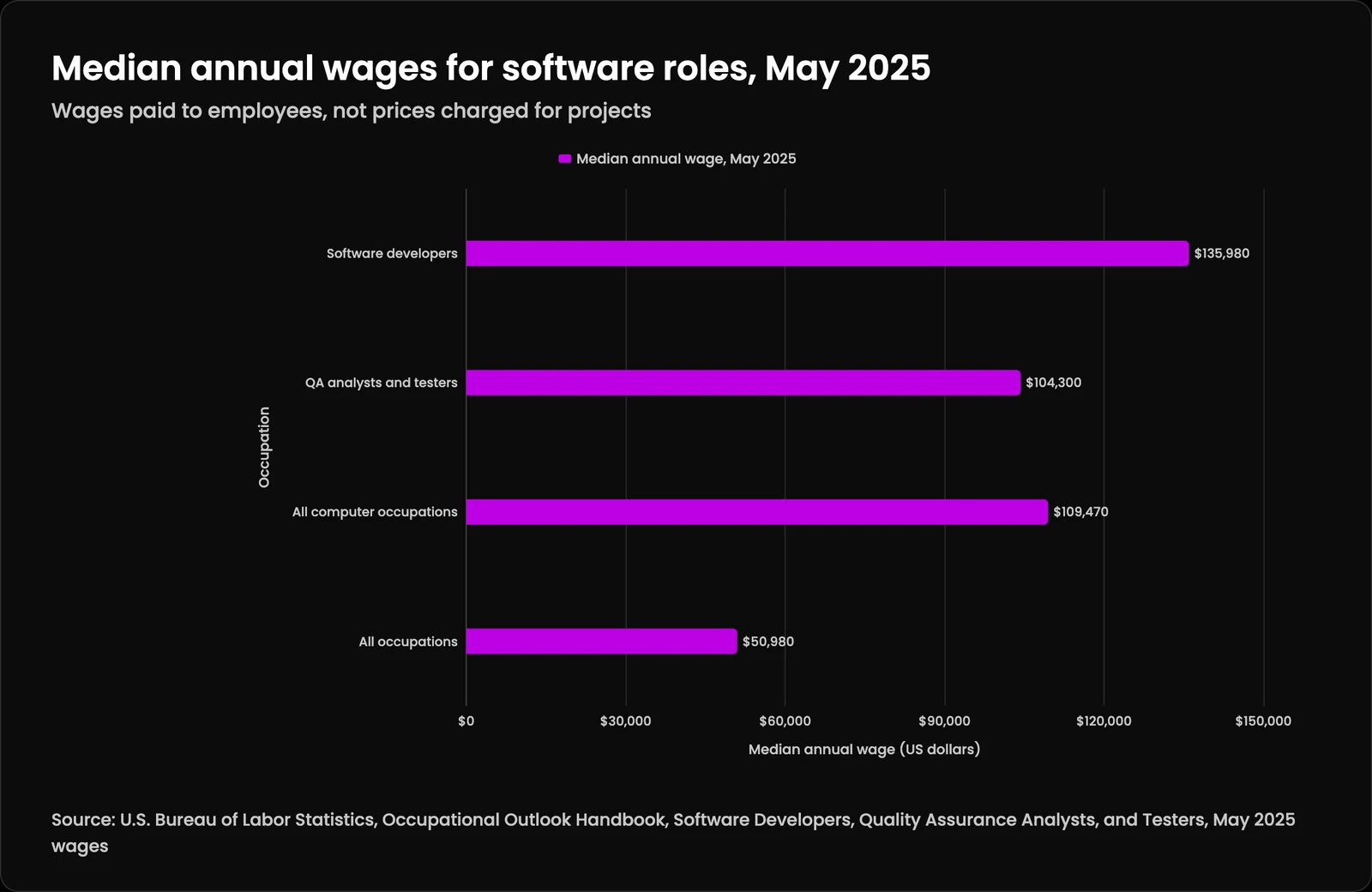
| Occupation | Median annual wage, May 2025 |
|---|---|
| Software developers | $135,980 |
| QA analysts and testers | $104,300 |
| All computer occupations | $109,470 |
| All occupations | $50,980 |
How do security and search differ for a web app vs website?
A website's security work is mostly patching, safe forms, and protecting the publishing login. A web application has to decide, on every request, who the person is and what they may see. The OWASP Top 10:2025 ranks broken access control first among web application risks and lists authentication failures seventh, which is why we design roles and permissions before screens.
Logins should follow current federal guidance. NIST SP 800-63B says passwords used as a single factor must be at least 15 characters, and that services should not impose composition rules or force periodic password changes. Accessibility applies to both: WCAG 2.2 covers forms, error messages, and keyboard use, which matter even more inside an app.
Search treats the two differently too. Public pages should be fully readable without running scripts; Google's JavaScript guidance says server-side or pre-rendering is still a great idea because not all bots can run JavaScript. Private app screens should stay out of the index entirely.
How do you know your website needs to become a web app?
When people keep asking the site to remember them, or staff keep re-typing what the site collected. Those are the signs that settle the web app vs website question in favor of software.
- Customers email or call to check a status your systems already know.
- Staff copy form submissions into a spreadsheet or another system by hand.
- You manage logins for clients in a shared document or a plugin you do not trust.
- Pricing, scheduling, or eligibility depends on rules a person applies each time.
- You pay for several subscriptions that each do part of one process.
- Partners or field staff need the same data from different places.
How does Kief Studio build websites and web apps?
We start by mapping how the work happens today, then settle the web app vs website split: which parts belong on public pages and which belong in an application. Both are custom code, written in TypeScript, Python, or Rust with frameworks such as React, React Router, and Astro chosen to fit the job. Public pages are built for phones first and carry structured data; application screens get roles and permissions designed in from the start.
We host both on dedicated infrastructure with managed hosting on LTFI, described on the LTFI page for websites designed and hosted for you. When an app needs answers grounded in your own documents, that usually means retrieval, explained in the Qurtoo glossary entry on RAG. Sites are also starting to expose actions to AI agents directly, covered in a briansgagne.com piece on turning websites into MCP servers. If you are choosing who should build it, our guides to hiring a web developer and choosing a custom software development company cover the questions to ask.
Also read
Web app vs website: what is the difference?: questions people ask
Is a web app a website?
What is a web application?
A web application is software that runs on a server and in your browser, so you use it without installing anything. It checks who you are, applies business rules, and stores your data. Online banking, browser email, customer portals, and booking systems are common examples.What are some web app vs website examples?
A restaurant's menu page, a law firm's service pages, and a company blog are websites. Online ordering with saved addresses, a client document portal, and a staff scheduling tool are web apps. An online store is both: public product pages plus an application for cart and checkout.Is Amazon a website or a web application?
Both. Its product pages work like a website that search engines index, while the cart, checkout, order history, and account settings are a web application that depends on who is signed in. Most large online services combine the two in the same way.What is a progressive web app?
A progressive web app is a web app built with standard web technologies that can be installed on a device and used like a native app. MDN notes it can work offline and in the background while still running on many devices from one codebase.Web app vs mobile app: which is better?
For most business tools a web app is the better start, because one codebase reaches phones, tablets, and computers without app store review. A native mobile app makes sense when you need deep device features, heavy offline use, or a store listing. A progressive web app covers much of the middle ground.Can a website become a web application?
Yes. Many do, one feature at a time: a client login, an online booking flow, or a quote calculator. The safest path keeps the public website separate and adds the application beside it, so new features do not put the pages that rank in search at risk.Are web apps secure?
They can be, when access control and authentication are designed in from the start. OWASP ranks broken access control as the top web application risk in its 2025 list. A secure web app checks permissions on every request, uses strong login rules, patches its dependencies, and logs what happens.What is a web portal vs a website?
A web portal is a kind of web app: a signed-in area where customers, partners, or staff see information and tasks meant for them. A website is the public face anyone can read. Many businesses run both, with a sign-in link from the website into the portal.Is a web app the same as SaaS?
Not quite. SaaS, or software as a service, is a way of selling software: you subscribe to an application someone else runs for many customers. Many SaaS products are web apps, but a custom web app can be built for one business and owned by it.Do web apps need internet?
Most do, because the data lives on a server. Progressive web apps can cache screens and data so some tasks keep working offline and sync when the connection returns. How much works offline is a design decision made early in the project.Do web apps need to be installed?
No. A web app opens in a browser at a web address, which is one of its biggest advantages. A progressive web app can optionally be installed to the home screen or desktop, so it opens in its own window like a native app.How is a web app different from a desktop application?
A desktop application is installed and runs on one computer, often storing data locally. A web app runs in a browser and keeps data on a server, so people can use it from any device and updates reach everyone at once without reinstalling.
Keep reading
More in Build
- ERP Systems
Your business runs on a dozen disconnected tools. An ERP connects them.
- API Integration
Your tools already know how to talk to each other. They just need someone to make the introduction.
- Legacy Modernization
Upgrade outdated systems without losing your data or your mind.