


Amelia GagneCo-founder and CEO, Kief Studio
- Published
- 10 min read

TL;DR: Managed AI services mean someone else sets up the AI, runs it and keeps it working, while you keep the decisions. At Kief Studio that means AI staff with real jobs on LTFI, your rules written down, a person's yes before anything goes out, and a log of everything. Nothing is installed at your end.
Managed AI services are what we offer owners who want AI doing real work in their business without becoming the person who runs it. Most of the owners we talk to have already tried AI on their own. They have a chatbot for drafts, a tool that writes posts, maybe a note taker. Each one helps a little, none of them knows what the others did, and nobody has time to keep them all pointed in the same direction.
This note explains what we set up when you hire us for managed AI services, what the AI staff actually do in a normal week, where you stay in charge, what drives the cost, and what the surveys say about small businesses that use AI. Kief Studio is based in the Worcester and Shrewsbury area, and we run this for businesses across Massachusetts and beyond.
What are managed AI services?
Managed AI services are AI that a provider sets up, runs and looks after for you, the way a managed IT provider looks after your computers. You don't pick models, connect accounts or babysit prompts. You tell us how the business works and what you want off your desk, and we build that into a system that runs every day.

Ours runs on LTFI, the system we built and run our own company on. If you want the category explained in depth, LTFI's own guide covers what an agentic business operating system is (opens in a new tab), and how we use it ourselves is in how Kief Studio runs its company on LTFI (opens in a new tab). This note is about the service: what you get when we do it for you.
How managed AI services differ from buying AI tools
Buying a tool gets you software. Managed AI services get you an outcome, with someone accountable for it. The difference shows up in three places.
- Setup. With a tool, you configure it. With managed AI services, we map your work, write the rules with you and connect the accounts that the job needs, and only those.
- Upkeep. Tools change every month. We keep yours working when they do, and you don't have to notice.
- Accountability. When something goes wrong, there is a log of what happened and a studio that answers for it.
What we set up for you on LTFI
On our LinkedIn Live session on agentic business operating systems, Brian walked through a made-up interiors studio and showed what a business looks like once this is running. The same pieces go into every client setup.
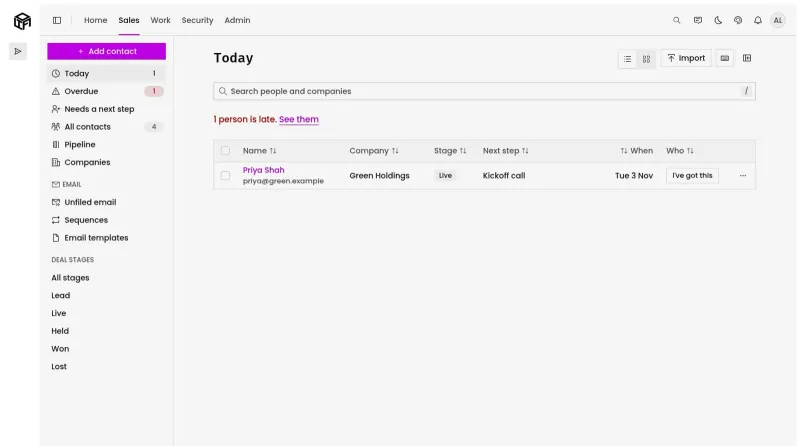
- One place for the records. Your team, customers, website and work live together, so nobody spends the week copying between tools.
- AI staff with real jobs. Each AI teammate owns a job, such as drafting, research, follow-ups or keeping records current. You talk to one chief of staff, and it hands out the work.
- Your rules, written once. Decide what every press release must include or how you sign off emails, and every AI teammate follows it from then on.
- A yes before anything goes out. Posts, emails to clients, payments and changes to your site wait for the person who owns them.
- A log of everything. Who asked, which AI teammate did the work and who approved it.
Your team can keep the AI tools they already like. Each one works from the same company memory, rules and records, so the work adds up instead of scattering.
What the AI staff do in a normal week
Here is what that looks like in practice for a small business, and where each job stops for a person.
- Follow-ups. The AI drafts replies to leads and customers and reminds you who has gone quiet. You approve what goes out.
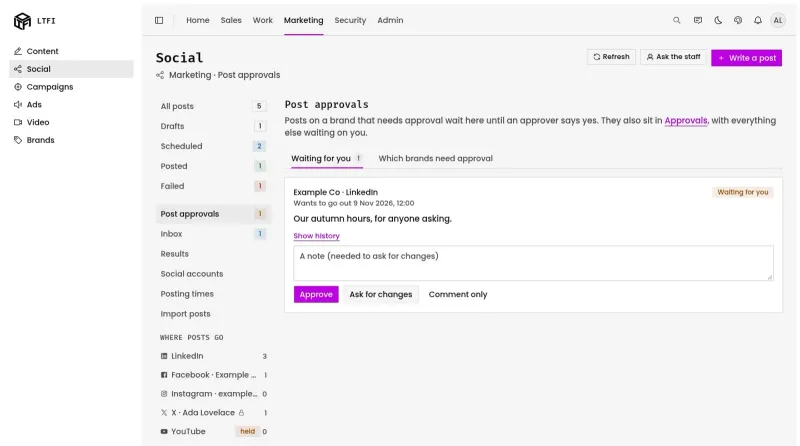
- Content and social posts. Drafts in your voice, lined up for each channel. Nothing posts until the approver says yes.
- Records. Contacts, projects and tasks stay current without anyone retyping them.
- Quotes and invoices. The AI prepares them from your own records. A person sends them.
- The weekly report. The numbers are pulled and explained in plain words, with what changed since last week.
- Answers for your team. Staff ask questions and get answers from your own documents, not guesses from the internet.
For the multi-step jobs, where one AI teammate's work goes to another to check, our note on multi-agent AI workflows for a small business goes deeper. And when a draft does arrive, it has already passed the checks described in how we stop bad AI output before you see it.
Where do you stay in charge?
By default, drafts go ahead on their own and anything that sends, posts, schedules or spends waits for a person's yes. Each company sets its own lines, and you can loosen one kind of work at a time once you trust it.
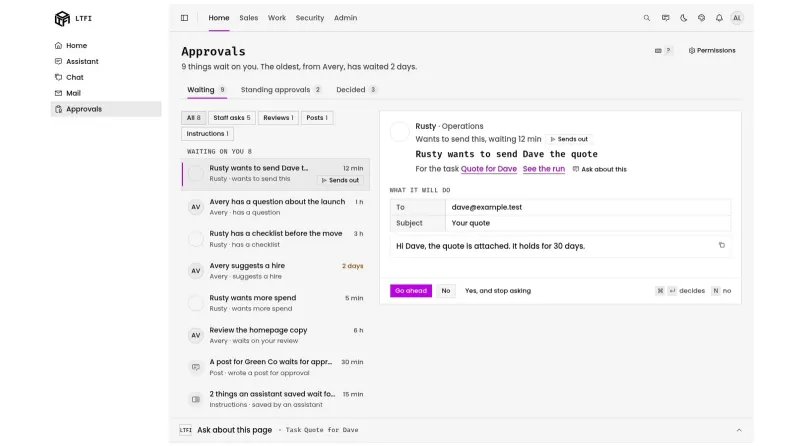
That default isn't only our preference. The joint guidance from the cyber agencies of Australia, the United States, Canada, New Zealand and the United Kingdom, Careful adoption of agentic AI services (opens in a new tab), says to prevent agents from autonomously executing high impact actions without prior human approval. We wrote up how approvals work day to day in the AI approval workflow, and what the log should record in the AI audit trail.
What only a person can do
Some things stay with people no matter what. Rules and instructions, who approves what, permissions, passwords and keys, deleting anything, and money are out of every AI teammate's reach. Each AI teammate sees only what its job needs, which we explain in least privilege for AI agents.
Why small businesses get stuck doing AI alone
Plenty of small businesses use AI. Far fewer have made it part of how the work gets done, and that gap is the reason services like ours exist. The Federal Reserve Banks' 2026 Report on Employer Firms (opens in a new tab), from 6,525 responses collected between September and November 2025, found that 46% of small employer firms said the business or its employees used AI, and another 15% planned to start within a year.

Among the firms already using it, 44% had partially integrated AI into their business processes and only 7% had fully integrated it. The rest were experimenting. Their reasons are familiar. Current users named accuracy (46%) and adapting tools to meet business needs (43%) as their top challenges, and firms planning to start named finding tools to meet business needs (54%).
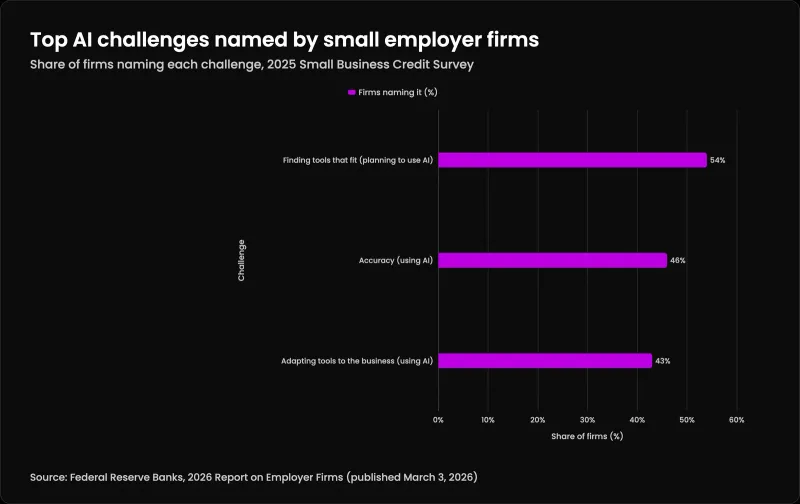
| Challenge | Firms naming it (%) |
|---|---|
| Finding tools that fit (planning to use AI) | 54% |
| Accuracy (using AI) | 46% |
| Adapting tools to the business (using AI) | 43% |
Every one of those is a setup problem, not a technology problem. Accuracy improves when the AI works from your own records with a person checking what goes out. Tools fit when someone shapes them around your work instead of the other way round. That is the work we take off your plate.
Does AI mean fewer people?
Not in the data so far. The Federal Reserve Bank of New York looked at the same survey in AI Adoption and Employment Expectations (opens in a new tab), published on Liberty Street Economics on October 8, 2026. Small businesses using AI had a 33 percentage point net expectation of higher employment over the next year, against 15 points for firms that don't use it, and a 48 point net expectation of higher revenue, against 21.
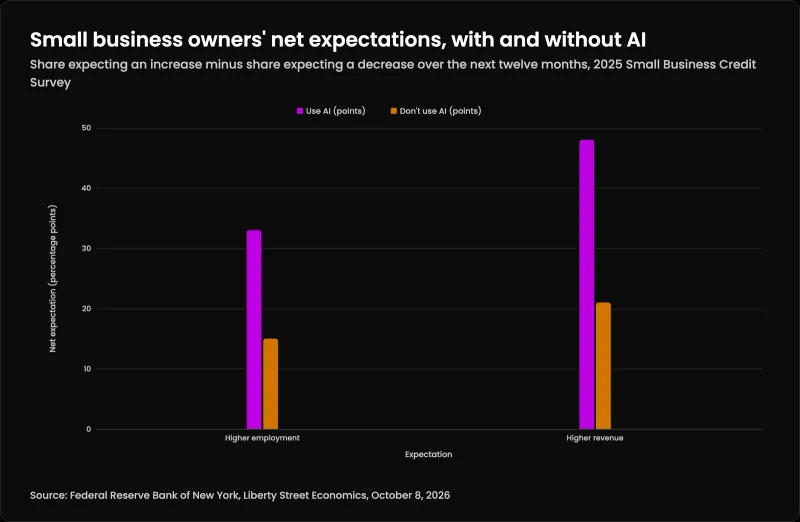
| Expectation | Use AI (points) | Don't use AI (points) |
|---|---|---|
| Higher employment | 33 | 15 |
| Higher revenue | 48 | 21 |
The authors are careful to call these associations, not causes: firms that adopt AI may simply be the ones already growing. What it does show is that owners using AI are mostly planning to hire, not cut. In our experience the AI staff take the busywork that sits between your people and what you sell, so your team spends more of the week on customers.
What do managed AI services cost?
We don't publish a rate card, because the cost depends on the work. We go through the cost on the first call, which is free, and if LTFI is the wrong fit for you we'll say so. These are the things that move the number.
What drives the cost of managed AI services
- How many jobs the AI staff take on. One routine job costs less to set up and run than five.
- How many accounts and systems connect. Email, calendar, your website, accounting and your customer records each take setup and care.
- How much AI work runs each month. More drafting, research and checking means more running cost.
- How many people approve. A single owner is simpler than several departments with their own approvers.
- Whether we also build something custom. Some businesses need a tool that doesn't exist yet. That is a build on top of the service.
Compare that against the hours your team spends each week on the work you'd hand over. That comparison is the honest way to judge it.
How we start managed AI services with a new client
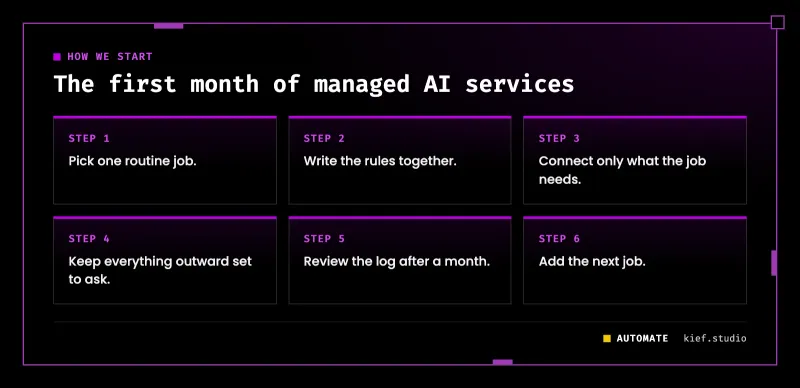
We start small on purpose. Every client begins the same way, and the order matters.
- Pick one routine job. Follow-ups or the weekly report are good first jobs because they're frequent, low risk and easy to check.
- Write the rules together. What runs alone, what waits for a yes, what only a person may ever do, and who approves each area.
- Connect only what the job needs. Each AI teammate gets the accounts its job uses and nothing more.
- Keep everything outward set to ask. Sending, posting, paying and site changes all wait for a person at the start.
- Review the log after a month. We look at what was approved, sent back and left waiting, and fix the instructions behind any send-backs.
- Add the next job. One at a time, never several at once.
Your contacts, files and content stay yours. If you ever leave, we export them for you.
Where we fit
Kief Studio sets up and runs managed AI services for small and mid-size businesses on LTFI, with nothing installed at your end. The service itself is described on our managed services page, and the wider AI and automation work, from production AI to content operations, is on the Automate line. If you're nearby, our Worcester page covers working with us in person. Tell us which job you'd hand over first and we'll show you what it would look like with your own work. First conversation is free. No commitment.
Frequently asked questions
What are managed AI services?
Managed AI services are AI that a provider sets up, runs and maintains for your business. You keep the decisions and approvals, and the provider keeps the system working, connected and following your rules.
How much do managed AI services cost?
It depends on how many jobs the AI staff take on, how many systems connect, how much AI work runs each month and whether anything custom is built. Kief Studio talks through the cost on a free first call rather than publishing a rate card.
Are managed AI services worth it for a small business?
They are when the same routine work happens every week and nobody has time to run AI tools well. Start with one job, measure the hours it took before, and compare after a month.
Is managed AI the same as a chatbot?
No. A chatbot answers what you type, then waits, and forgets the conversation. Managed AI services give AI staff your company's records, a job each, limits you set and a log of everything they did.
Will managed AI services make things up?
The AI works from your own records, it writes drafts rather than decisions, and anything that sends, posts, publishes or spends waits for a person. A bad draft costs you a few seconds. A bad email to a client never leaves.
Is my data safe with managed AI services?
Each company runs on its own private server that we manage, with no shared hosting. Each AI teammate sees only what its job needs, and rules, permissions, credentials, deleting and money stay with people.
Am I locked in to managed AI services?
No. Your contacts, files and content are yours, and if you leave we export them for you.
Do my staff need to learn new software?
Not necessarily. The web app is there if they want it, and people who already work in an AI assistant can use the system from there, with the same rules and approvals.
Co-founder and CEO, Kief Studio
Related articles

Automate
AI Consulting in Massachusetts: What to Expect and Ask
AI consulting in Massachusetts for a small business: what the work includes, what you should have running at the end, and which state rules apply.
Brian Gagne

Automate
AI Implementation Timeline in Worcester: What We Set Up in the First Two Weeks
Our AI implementation timeline for Worcester and Shrewsbury teams: one workflow, named approvers and a full log, day by day through the first two weeks.
Amelia Gagne

Automate
AI Consultant in Worcester, MA: What One Does and Costs
An AI consultant in Worcester, MA: what the work includes, whether you need one yet, what drives the cost, and how to spot hype before you sign.
Amelia Gagne