


Brian GagneCo-founder and CTO, Kief Studio
- Published
- Updated
- 13 min read

TL;DR: AI for contractors works best as a drafting crew, not a decision maker. It writes the first version of estimates, lead follow-ups, schedules, change orders, invoices and review requests, and the owner approves anything that goes to a customer. Start with one workflow, keep the price and the promise human, and log every send.
AI for contractors gets sold as a robot office manager. The useful version is smaller and more practical: software that does the typing, so the owner spends evenings approving work instead of writing it.
Most of a contractor's office time goes into the same six documents, written over and over: the quote, the "just checking in" text, the schedule change, the change order, the invoice, and the review request. AI is good at first drafts of all six. It is not good at knowing your costs, your crew, or what you promised a homeowner standing in her driveway. So the setup that works keeps those two jobs apart.
What does AI for contractors actually do?
Strip away the marketing and AI for contractors does three things:
- Drafts. It writes the first version of a message or document from what it already knows: the lead form, your notes, past jobs, your price book.
- Sorts. It reads incoming texts, emails and form fills and decides which pile each one goes in: new lead, existing job, billing question, complaint.
- Reminds. It notices that a quote went out nine days ago with no answer, or that an invoice is past due, and queues the follow-up.
What it should not do on its own is set a price, commit a date, or agree to a change in scope. Those are promises, and promises belong to the person whose name is on the contract.
That split has a name in our work: AI drafts with approval. The system prepares the message, a person reads it, and one tap sends it or sends it back. Done this way, AI for contractors keeps the owner in control and makes the evenings shorter.
The approval step has a concrete reason. NIST's guidance on generative AI names "confabulation" as a core risk: "the production of confidently stated but erroneous or false content." (NIST AI 600-1, July 2024) A confident wrong number on a quote is still a wrong number.
How many contractors use AI today?
Fewer than the ads suggest; AI for contractors is still early. In the Census Bureau's Business Trends and Outlook Survey, 17.1% of construction businesses said they used AI in a business function in the prior two weeks, against 24.2% of all U.S. businesses. That is the survey round collected October 19 to November 1, 2026. (U.S. Census Bureau, BTOS sector estimates, November 2026; BTOS national estimates)
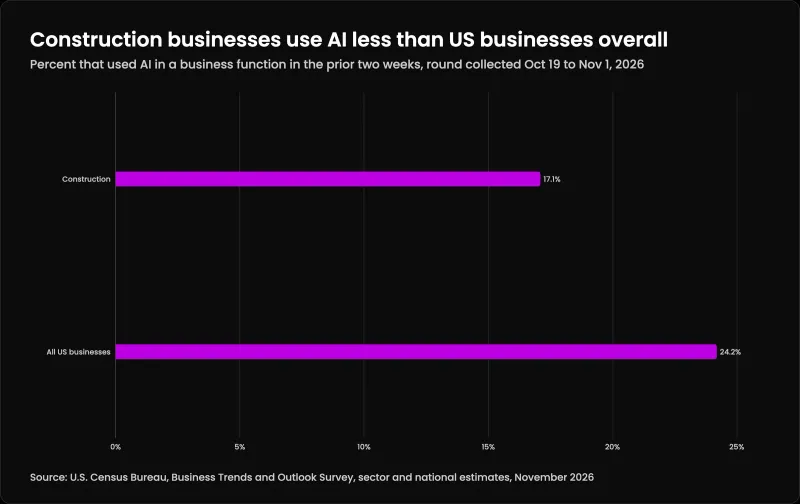
| Businesses | Used AI in a business function |
|---|---|
| Construction | 17.1% |
| All US businesses | 24.2% |
The trend is the part worth noticing. In the round collected in late November 2025, the construction figure was 7.4%. It has more than doubled in under a year, and 19.4% of construction businesses expect to be using AI in the next six months. (U.S. Census Bureau, BTOS)
Put that next to the size of the trade here. Massachusetts had about 167,500 construction jobs in September 2026, a preliminary figure. (BLS, Economy at a Glance: Massachusetts) Plenty of the companies behind those jobs still run the office from the owner's phone after dinner. That is the gap AI for contractors can close.
Where does AI for contractors fit from estimate to invoice?
Walk a job from first call to final payment and drafting shows up at every step. Here is what AI for contractors can prepare at each one, and what stays with a person.

Lead follow-up and speed to lead
A homeowner fills out your form at 9:40 at night. By morning she has filled out two more. Speed to lead is simple: answer while she is still deciding, not after she has booked someone else.
AI can draft a reply within minutes: thanks, a question or two about the job, and two open slots for a site visit pulled from your calendar. The owner, or whoever holds the phone that night, approves it with one tap. Lead follow-up is where AI for contractors usually pays off first, and it follows the same pattern: a short, specific nudge on day two and day seven, drafted and queued, never sent blind.
If you also want calls answered, our note on an AI receptionist for a local business covers what a voice system should and should not handle.
AI estimating: a draft, not a price
The Bureau of Labor Statistics describes estimating work as collecting and analyzing data "in order to assess the time, money, materials, and labor required." (BLS Occupational Outlook Handbook, cost estimators) Software already does much of the arithmetic. AI estimating adds a draft of the words around the numbers.
Give it your site notes, photos and your own price book, and it can lay out a scope of work, list materials by line, and flag what is missing ("no measurement for the back stairs"). The owner sets the price, checks quantities, and decides what is included. The AI never invents a unit cost.
Example: a roofing company in Millbury might photograph a job, dictate two minutes of notes in the truck, and find a formatted draft quote waiting at the office. The estimator spends ten minutes checking it instead of forty writing it.
Job scheduling
This is AI for contractors at its least exciting and most useful. Job scheduling breaks on the same things every week: rain, a late delivery, an inspection that moved. AI can read the change, draft the new schedule, and prepare the texts to every customer affected. A person confirms the plan before anyone gets told a new date.
Example: a landscaping crew in Uxbridge might lose Tuesday to weather. The system drafts a reshuffled week and a message to each affected customer. The owner moves one job by hand, approves the rest, and is done before coffee.
Change orders
Change orders are where AI for contractors saves the most arguments. The customer asks for a different tile on site; the crew lead mentions it in a text; three weeks later nobody agrees on what was said.
AI can turn that text into a written change order the same day: what changed, the new price, the new completion date, a line for the customer's signature. Massachusetts law gives you a reason to care. Under the Home Improvement Contractor law, "deviating from or disregarding plans or specifications in any material respect without the consent of the owner" is a prohibited act, and violations count as unfair or deceptive acts under chapter 93A. (M.G.L. c. 142A, s. 17) A signed change order is how you show consent.
Invoices and payment reminders
Invoices follow the contract's payment schedule, so the AI's job is to match the work done to the right milestone, draft the invoice, and draft polite reminders when it goes unpaid. It should never change an amount on its own.
Massachusetts limits deposits on home improvement work: a deposit "shall not exceed the greater of one-third of the total contract price" or the cost of special-order materials. (M.G.L. c. 142A, s. 2) A good drafting system checks the deposit line against that rule before the owner ever sees it.
If you do public work, the paperwork is heavier. I wrote about the weekly payroll records Massachusetts prevailing wage jobs require (opens in a new tab), and about what DCAMM asks of contractors bidding on state work (opens in a new tab). Both are good places to let AI assemble the packet while a person signs it.
Review requests
When the job closes, AI can draft a short thank-you with a review link. Two rules keep it clean. The FTC's rule on consumer reviews bans fake reviews, and the FTC said when it announced the rule that it is meant to "deter AI-generated fake reviews." (FTC, August 2024) And incentives are allowed only "as long as there isn't an express or implied requirement that the reviews have to express a particular sentiment." (FTC, Consumer Reviews and Testimonials Rule Q&A)
So ask every customer, not only the happy ones, and never let AI for contractors write a review for anyone. I covered the details in whether it is legal to ask customers for Google reviews (opens in a new tab).
What does Massachusetts law expect from an AI-drafted contract?
If an AI drafts your home improvement contract, the law does not care who typed it. It cares what is in it. Under chapter 142A, every residential contracting agreement over one thousand dollars "shall be in writing" and must include, among other things:

- the complete agreement and the full names and addresses of the parties, with the contractor's registration number;
- the date work is scheduled to begin and the date it is scheduled to be substantially completed;
- "a detailed description of the work to be done and the materials to be used";
- the total amount to be paid and a payment schedule;
- the signatures of all parties;
- notices, including the owner's three-day cancellation rights where they apply and the warning "Do not sign this contract if there are any blank spaces."
That last line is the best test of AI for contractors you will find. A template with an unfilled placeholder is a contract with a blank space. The fix is a check that runs before the owner reviews: every required field filled, the registration number on the first page, the deposit within the cap. Anything missing goes back with a note instead of out the door.
Our note on quality gates for AI output explains how those checks work in general.
Should a contractor let AI answer customer texts?
Yes for the easy ones, with rules. Text replies are the most visible use of AI for contractors, because the customer reads them directly. Sort them three ways:

- Send on its own: confirmations the customer asked for, such as "we received your request" or "your crew arrives between 8 and 9 tomorrow," when the time came from your schedule.
- Draft for approval: anything with a price, a date change, a scope question or an apology.
- Hand to a person immediately: complaints, damage, safety, anything about money already paid, and anyone who asks for a human.
Start with almost everything in the second group. Move a message type to the first group only after you have approved it unchanged dozens of times. Give the system access only to what each step needs; our note on least privilege for AI agents covers why.
Honesty counts here too. The FTC's position is plain: "Using AI tools to trick, mislead, or defraud people is illegal." (FTC, September 2024) A drafted text that sounds like you is fine. A text that claims a visit happened when it did not is not.
How do you set up AI drafts with approval?
- Pick one workflow. The first job for AI for contractors is usually lead follow-up: high volume, low risk, fast feedback. Leave estimates for second.
- Connect what you already run. The AI needs your contractor CRM, calendar, price book and texting line. That is integration work: data moving between the tools you already pay for, without anyone copying it by hand. Our guide to the systems a contractor runs on covers the stack underneath.
- Write down what good looks like. Five sample replies you would send yourself. Words you never use. The facts a draft must include.
- Approve everything for the first month. Track how many drafts you sent unchanged, edited, or rejected. That ratio tells you whether it is working.
- Keep the log. Every draft, every edit, every send, with who approved it. When a customer says "you told me Thursday," you can check.
Home service automation built this way hands the office a stack of finished drafts each morning, and the office decides what goes out. Meelie, my wife and co-founder, wrote about what AI agents do at 3am versus in the demo (opens in a new tab), which is the difference between this setup and a chatbot that only works on a good day.
What does AI for contractors cost?
We found no reliable public price range for AI for contractors from a neutral source, so we will not print one. What drives the cost:
- How many workflows. Lead follow-up alone is a much smaller job than estimate to invoice.
- What it connects to. A contractor CRM with a documented API is straightforward; a spreadsheet and a paper calendar mean setup work first.
- Volume. Model usage is often metered, so a busy season costs more to run than a slow one.
- Who runs it. A subscription tool you configure yourself costs your time. A hosted system someone else operates costs money and saves that time.
Kief Studio prices custom work around the use case, the size of the business, what it needs and the systems it already has. Whether to own the system or rent a subscription is its own question; our note on owning versus renting AI lays out the trade.
AI for contractors in Central Mass and the 495 belt
AI for contractors changes more by trade than by town. Some hypothetical starting points:
- A roofer in Millbury might start with AI estimating from site photos, because quoting is the bottleneck in spring.
- A landscaping company in Uxbridge might start with job scheduling, because weather rewrites the week.
- A kitchen remodeler in Bellingham might start with change orders, because a six-week job collects a dozen small decisions.
If you want to learn the basics before you buy anything, the Massachusetts AI Hub, part of MassTech, leads a statewide program announced in February 2026 meant to "help provide every resident and small business with the AI and tech skills" they need, at no cost. (MassTech, February 2026)
And if homeowners now find contractors by asking an AI assistant, Amelia's guide to AEO for Massachusetts local service businesses (opens in a new tab) covers how to show up in those answers.
Frequently asked questions
Will AI take construction worker jobs?
The early survey data does not show it. In the Census Bureau's latest survey round, the first to ask this question, 87.6% of construction businesses said their use of AI had not changed their headcount over the previous six months; 4.2% said it went up and 3.1% said it went down. AI drafts office work. It does not frame a wall or run a service call.
Can AI write construction estimates?
It can write the draft: scope, materials list and formatting, from your notes, photos and price book. A person should set the price and check every quantity, because a model can state a wrong number with full confidence.
What is the best AI for contractors?
The best AI for contractors is the one that connects to the systems you already use, drafts in your words, and lets you approve before anything is sent. The model behind it matters less than those three things, and a good setup can switch models later.
Which is best for AI automation in a home service business?
Start with lead follow-up. It is frequent, low risk and easy to measure: response time, replies, and booked visits. Estimates, scheduling and change orders come after the approval habit is set.
Should a contractor let AI answer customer texts?
For simple confirmations, yes. Anything about price, dates, scope, damage or complaints should be drafted for approval or handed straight to a person. Begin with everything approved and loosen it slowly.
Is AI for contractors worth it for a small crew?
It is worth testing if the owner spends evenings on quotes, follow-ups and invoices. Run one workflow for a month, count the drafts you approved unchanged, and compare the hours. If the drafts need heavy rewriting, stop there.
Does AI for contractors need a new contractor CRM?
Usually not. If your current CRM or job management tool has an API, the AI can work on top of it. If it does not, that is the first problem to solve, and it is worth solving before adding AI.
This article is general information, not legal advice. Kief Studio is not a law firm, and reading it does not create an attorney-client relationship. Laws and regulations change, so check the current text and talk with a licensed Massachusetts attorney about your situation.
Where we fit
AI for contractors, built this way, is the work we do in AI implementation: taking an AI idea out of the demo and into daily work, where input is messy, services fail, and a person checks the cases the model is unsure about. We pick the workflow with you, define what good output looks like, build the automation with quality gates on every output, and keep a human path for anything uncertain. It is not a project to replace your crew or your office; your people drive the work.
It runs on LTFI, a private system Kief Studio hosts and runs for you, and it works with any model provider, so nothing is installed on your side. LTFI's CRM, projects and AI staff (opens in a new tab) are where drafts wait for your approval. When the drafts need your existing tools, we connect them through API integration, built on authorized APIs only. The method is written up in the LTFI methodology, and the wider service is on our AI automation page.
We are in Shrewsbury and work with contractors across Central Massachusetts and the 495 belt, including Millbury, Uxbridge and Bellingham.
First conversation is free. No commitment.
Co-founder and CTO, Kief Studio