


Brian GagneCo-founder and CTO, Kief Studio
- Published
- Updated
- 14 min read

TL;DR: AI tools for small business are worth paying for when they do one job you can name: drafting email, sorting receipts, writing a first draft of content, or answering routine customer questions. In Massachusetts, add three things: a one-page AI policy, the Attorney General's 2024 advisory, and the state's training grants.
Most lists of AI tools for small business are a wall of brand names. That is the wrong starting point. A tool is only useful if it takes a job off somebody's desk, and the jobs at a 12-person office in Lowell look a lot like the jobs at a 12-person office in Leominster.
So this is the list by job, not by brand. For each job: what the tool does, where it goes wrong, and what to check before anyone pays. Then the Massachusetts part: the rules that already apply and the grants that can pay for training.
Can AI help me run a business in Massachusetts?
Yes, for specific jobs, and plenty of owners here have started. In the Census Bureau's Business Trends and Outlook Survey, 20.4% of Massachusetts businesses said they used AI in a business function in the two weeks ending October 18, 2026. The cycle before, it was 25.7%. The state number moves a few points from one survey to the next, so read it as roughly one in four or five businesses, not a precise score. (U.S. Census Bureau, BTOS state data, November 2026)
The same survey asks a second question that matters more for a small team: did your employees use generative AI for work tasks? In Massachusetts, 24.7% of businesses said yes in the latest cycle. (U.S. Census Bureau, BTOS state data, November 2026) Put those two numbers side by side: about as many businesses say their employees use generative AI as say the business uses AI at all. If your staff are in that group, it is time for a written rule.
How much time does it save? On average, a modest amount. The St. Louis Fed's tracker found the share of all work hours saved by generative AI grew from 1.6% to 2.2%, based on what workers report themselves. (Federal Reserve Bank of St. Louis, FRED Blog, August 2026) Two percent of a 40-hour week is under an hour. To beat the average, pick one job, set the tool up for it, and check the output. My piece on whether AI saves time at work (opens in a new tab) has a 30-day way to measure it in your own shop.
Our note on how Massachusetts small businesses use AI platforms covers the Massachusetts small business AI adoption picture in more depth. The question here is the next one: which job first.
Which AI tools for small business fit which job?
Five jobs are a good place for AI for business owners to start. For each, here is what it looks like and the one check that keeps it safe.

1. Email and the inbox
The job: draft replies, summarize long threads, pull the ask out of a three-page email, and sort what needs you from what can wait. Check whether your email or office suite already includes an assistant before you buy another tool.
Example: a property manager in Lowell might get 80 tenant emails a week. An assistant could draft a reply to each routine one (parking, trash day, lease renewal dates) from the building's own policy sheet, and a person reads and sends every draft. The time saved is in typing, not in judgment.
The check: the assistant only sees what you give it. If it drafts from an old policy, it sends an old answer. Keep one current source document for each topic and point the tool at that.
2. Books, invoices and paperwork
The job: read receipts and invoices, suggest a category, match payments, and flag what does not match. Check whether your accounting package already does this. The value is in the matching, not the math.
Example: a landscaping company in Leominster might photograph every receipt from the truck. The software reads the vendor, date and amount and suggests a category, and the bookkeeper reviews the batch on Friday and fixes the ones that are wrong.
The check: the books are still yours. Keep a person on the review step, and do not let the software post entries on its own until you have watched a full month of suggestions. If your firm keeps books for others, our note on technology for accounting and bookkeeping firms covers the setup.
3. Content and marketing
The job: outlines, first drafts, product descriptions, social captions, and rewording what you already wrote for a different audience. It is an easy place to start, and unedited generated copy is easy to spot.
Example: a bakery in Worcester might write one paragraph about a new seasonal item and have AI turn it into a menu line, a short post and an email blurb. The owner then edits all three so they sound like the bakery.
The check: every claim in the copy is yours, even if a tool wrote it. Read every draft for facts, prices and dates before it goes out. Our note on content automation without slop shows how to keep the voice and catch the errors.
4. Customer replies and the front desk
The job: answer routine questions on the website or phone after hours (hours, directions, booking, where an order is) and pass anything unusual to a person.
This is the riskiest job for AI tools for small business, because the answer goes straight to a customer. In 2024, a British Columbia tribunal ordered Air Canada to pay a customer after its website chatbot gave wrong information about bereavement fares. The tribunal member wrote, "I find Air Canada did not take reasonable care to ensure its chatbot was accurate," and ordered the airline to pay $812. (CBC News, February 2024) That case was in Canada, but the lesson travels: the business owns what its bot says.
The check: give the bot a short list of topics it may answer, a source page for each, and a clear handoff to a person for everything else. Our note on AI receptionists for a local business walks through that setup.
5. Answering your own staff's questions
The job: a searchable answer box for the handbook, the procedures and the "how do we do this again" questions that interrupt the owner ten times a day.
Example: a dental office in Worcester might load its front desk procedures, insurance notes and opening checklist. A new hire asks the tool instead of the office manager, and the answer links to the source document so they can check it.
The check: it is only as good as the documents behind it, and someone has to own keeping them current. See our note on an AI knowledge base for staff questions.
What AI should you pay for, and what can stay free?
Free AI tools for small business are fine for trying a job. They are a poor place for customer data. The question to ask about a free tier versus a paid business plan is less about the answers and more about the terms: who can see what you type, whether it is used to improve the product, how long it is kept, and whether you get admin controls.
Here is a short way to decide what AI to pay for:
- Name the job. One sentence: "Draft replies to routine tenant emails." If you cannot write the sentence, you are not ready to buy.
- Check what you already own. Your email suite, accounting package or phone system may already include an assistant.
- Read the data terms before anyone pastes in customer information. Look for training on your inputs, retention, and whether an admin can turn features off.
- Run it for 30 days on one job. Count the drafts it produced, the ones a person had to fix, and the time it took.
- Pay for seats only for the people who used it. Expand after the numbers say so.
I compared which business AI plan to pay for (opens in a new tab) on my own site, plan by plan. The short version here: AI tools for small business earn their seat on one measured job, not on a feature list.
A 30-day test for AI tools for small business
Week one, set it up on a single job with one person. Week two, have that person log every output as used as is, edited, or thrown out. Week three, add a second person. Week four, total it. If more than half the outputs need a heavy rewrite, the setup is wrong or the job is wrong. Fix one of them before you buy more seats.
What Massachusetts rules apply to AI tools?
The rules that matter most today are laws Massachusetts already has. On April 16, 2024, Attorney General Andrea Campbell issued an advisory to "developers, suppliers, and users" of AI, which means a business using an AI tool is in scope, not just the companies that build them. (Massachusetts Attorney General, Advisory on AI, April 2024) Coverage at the time summed it up: the advisory says "existing state consumer protection, anti-discrimination and data security laws still apply to emerging technologies." (WBUR and the Associated Press, April 2024)

Three parts of the advisory matter most for AI tools for small business:
- Customer data. The advisory says AI developers, suppliers and users "must take the necessary and appropriate steps to safeguard personal information used by those systems," pointing to 201 CMR 17.00, the state's data security regulation, and the breach notification law. If a tool sees customer names and account numbers, it belongs in your written security program.
- Claims. It lists misrepresenting "the reliability, manner of performance, safety, or condition of an AI system" as unfair or deceptive. Do not tell customers a bot is a person, or that a process is reviewed by a person when it is not.
- Hiring and decisions about people. The state's anti-discrimination law "prohibits developers, suppliers, and users of AI systems from deploying technology that discriminates against residents on the basis of a legally protected characteristic." Keep a person on any decision about hiring, pay, credit or tenancy.
All three quotes come from the advisory itself. (Massachusetts Attorney General, Advisory on AI, April 2024) The Massachusetts section of MyRHC (opens in a new tab) indexes the state rules and the official documents behind them if you want to read the source.
Write a one-page AI policy
An AI policy does not need a lawyer to start. One page answers four questions: which tools staff may use, what data never goes into them, who reviews output before it reaches a customer, and who to tell when something goes wrong. For structure, the federal government's NIST AI Risk Management Framework is "intended for voluntary use" and is a good checklist to borrow from. (NIST, AI Risk Management Framework) My wife Amelia, Kief Studio's co-founder and CEO, wrote how to build an AI policy for your team (opens in a new tab).
This article is general information, not legal advice. Kief Studio is not a law firm, and reading it does not create an attorney-client relationship. Laws and regulations change, so check the current text and talk with a licensed Massachusetts attorney about your situation.
Are there AI grants in Massachusetts for small businesses?
The AI grants in Massachusetts that a small business can use today pay for training, not software. That is still useful: AI tools for small business only save time when the people using them know what to check.

The Workforce Training Fund Express Program. It reimburses approved training courses for businesses with 100 or fewer Massachusetts employees, "up to $15,000 per calendar year," and up to "$3000 per person course." (Commonwealth Corporation, Express Program for applicants) Since April 1, 2026, employers with 51 to 100 Massachusetts employees can get up to 100% reimbursement, up from 50%. (Commonwealth Corporation, Workforce Training Fund policy updates, 2026) AI courses are a named category in the fund: courses that "develop employees' skills and abilities to effectively use artificial intelligence tools, technologies and concepts in the context of their jobs." (Commonwealth Corporation, Workforce Training Fund course definitions) The course has to be an approved one, and your business has to pay into the fund, so check both before you sign anyone up. I wrote a full guide to the Massachusetts AI training grant for employers (opens in a new tab).
Free Google AI training through the Massachusetts AI Hub. In February 2026 the state announced a partnership giving all residents no-cost access to Grow with Google AI training, including the Google AI Professional Certificate, led by the Massachusetts AI Hub at MassTech. The announcement says it is designed to help "every resident and small business" with AI and tech skills. (MassTech, February 2026) For AI training for employees on a tight budget, that is the place to start.
For the wider list of state programs, see our note on Massachusetts technology funding programs for small businesses.
How do you roll out AI tools for small business in the first month?
Here is a one-page plan, the kind we would sketch with an owner on a first call.
- Pick one job from the five above, the one that eats the most hours each week.
- Write the AI policy on one page before the tool goes live.
- Use what you own first, then compare one paid option.
- Train the people who will use it. Check the Express Program before you pay for a course.
- Measure for 30 days, then keep, fix or drop it.
For a 15-person insurance agency in Worcester, that might be email drafting first. For a manufacturer near Lowell, it might be quote paperwork. For a contractor in Leominster, it might be receipts. The job changes; the order of the steps does not.
When a tool starts touching customer data or making decisions on its own, read our note on AI security for a small business first.
Frequently asked questions
Can AI help me run a business?
Yes. AI tools for small business work on specific jobs: drafting email, sorting receipts, first drafts of content, routine customer questions and staff questions. It works best when a person reviews the output and the tool is measured on one job before it spreads.
What legally qualifies as a small business?
It depends on the program. For federal contracting, the SBA sets size standards by industry; most manufacturers with 500 employees or fewer and most other businesses with average annual receipts under $7.5 million qualify. (U.S. Small Business Administration, size standards) The SBA's research office generally counts firms with fewer than 500 employees. State programs set their own limits, such as the Express Program's 100 Massachusetts employees.
What small business is booming right now in Massachusetts?
By count, professional, scientific and technical services lead, with 127,003 small businesses, followed by transportation and warehousing (86,586) and construction (80,114). Massachusetts has 756,096 small businesses, 99.5 percent of all businesses in the state. (SBA Office of Advocacy, 2025 Massachusetts profile, June 2025) Most of those businesses have no employees at all, and those are 2022 counts, so treat them as a picture of where the businesses are, not a forecast.
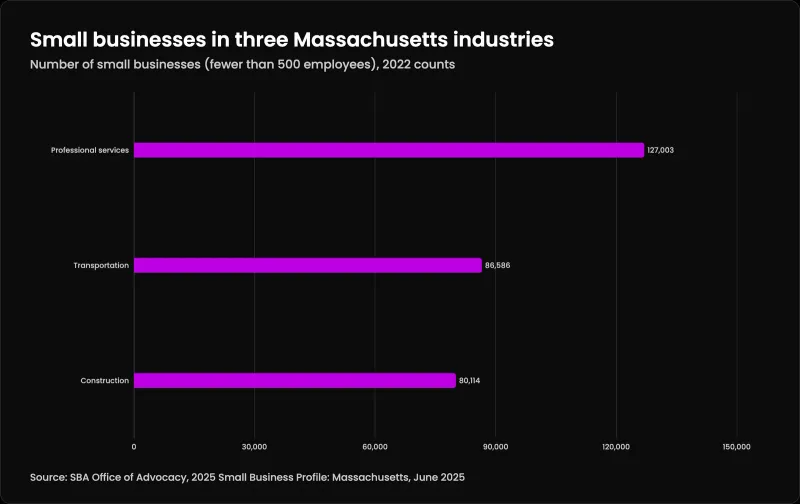
| Industry | Small businesses |
|---|---|
| Professional services | 127,003 |
| Transportation | 86,586 |
| Construction | 80,114 |
Are there free AI tools for small business?
Yes. Free tiers exist, and the email, office or accounting software you already pay for may include AI features. Free is fine for testing a job. Before anyone puts customer information in, read the data terms, and move to a business plan with admin controls if you keep using it.
Which AI is best for small business owners?
There is no single best one. The best of the AI tools for small business is the one that does a job you can name, on data terms you have read, and still holds up after a 30-day test with a person reviewing the output. Start with what your email, office or accounting software already includes.
What is the 30% rule in AI?
It is an informal rule of thumb, not a law or a standard. One common reading is that AI does about 70% of a task and people keep the 30% that needs judgment, such as quality control. (BGR, June 2026)
Are there Massachusetts grants for AI training?
Yes. The Workforce Training Fund Express Program reimburses approved courses for businesses with 100 or fewer Massachusetts employees, up to $15,000 per calendar year. The Massachusetts AI Hub also offers free Google AI training to residents.
Where we fit
Most of the AI tools for small business above are things you can set up yourself, and you should. Where we come in is the step after: taking an AI idea out of the demo and into daily work, where input is messy, services fail, and a person checks the cases the model is unsure about.
The work follows the order above. We pick the workflow, define what good output looks like and measure how it runs today. Then we build the automation with retries, error handling and quality gates on every output, keep a human path for anything the model is unsure about, and run it for you on LTFI (opens in a new tab), so nothing is installed on your side. It is not for demo-only chatbots or projects meant to replace staff. Your people drive the work. See AI automation and implementation and the knowledge base note on AI implementation.
If you are still deciding what to buy at all, our technology advisory is vendor-neutral: what to build, what to buy, and what to skip, in a plan you can fund. We are in Shrewsbury and work with businesses across Massachusetts, from Worcester to Lowell and Leominster. More on the Automate line.
First conversation is free. No commitment.
Co-founder and CTO, Kief Studio