
Make sure the page is indexed and eligible to show with a snippet, which is all Google requires. Then answer real questions in the first sentence under a question heading, add knowledge only you have, cite sources, keep structured data matched to the page, and track results in Search Console's generative AI report.

How to show up in AI Overviews
How to show up in AI Overviews starts with one rule Google states plainly: the page must be indexed and eligible to appear in Google Search with a snippet, with no additional technical requirements. Then answer real questions directly under question headings, add knowledge only you have, cite sources, keep structured data matched to the page, and track results in Search Console.
What are Google AI Overviews?
AI Overviews are the AI-written summaries Google shows above some search results, with links to the pages it drew on. Google's page on AI features and your website says they appear only when its systems decide a summary adds something to classic results, so many searches never show one. AI Mode is the longer, conversational version for questions that need several steps or a comparison.
Both features use what Google calls query fan-out: they run several related searches across subtopics and sources, then build one answer. That is why a single good page can be cited for questions it never names exactly, as long as a section of it answers one of the smaller questions well. Engineers call the general pattern of fetching documents and then writing from them retrieval-augmented generation; Google's version retrieves from its own Search index.
How to show up in AI Overviews: what does Google require?
Google requires only that a page be indexed and eligible to appear in Search with a snippet. Its AI features documentation says there are no additional technical requirements and no special optimizations, and that indexing and serving are never certain. It also says "you don't need to create new machine readable files, AI text files, or markup to appear in these features."
| Item | Google's position | What to do |
|---|---|---|
| Crawling | Must be allowed in robots.txt and by any CDN or hosting layer | Check robots.txt, the firewall and bot rules for Googlebot |
| Snippet eligibility | Required; nosnippet blocks use as direct input | Remove snippet blocks you did not mean to set |
| Helpful, original content | Rewarded; non-commodity knowledge from experience | Write what only your business knows |
| Clear structure | Paragraphs, sections and headings help | Use question headings with the answer first |
| Images and video | Support the text where relevant | Add real photos and short clips with captions |
| Structured data | Not required; no special schema; must match visible text | Keep it accurate, never ahead of the page |
| llms.txt and AI text files | Google Search doesn't use them | Optional for other services, not a Google plan |
| Page length and chunking | No ideal length; no need to split content | Write for the reader, then stop |
| Pages for every query variation | Violates the scaled content abuse policy | One strong page per real question |
| Business Profile and Merchant Center | Help local and retail visibility in AI responses | Keep hours, services and products current |
So the honest answer to the question of how to show up in AI Overviews is that it is SEO done properly, with a few habits that matter more when a model is choosing passages. Google's 2026 guide to optimizing for generative AI features lists what helps and what it ignores. The table sums it up in Google's terms, and the steps below turn it into work.
Which searches show AI Overviews most often?
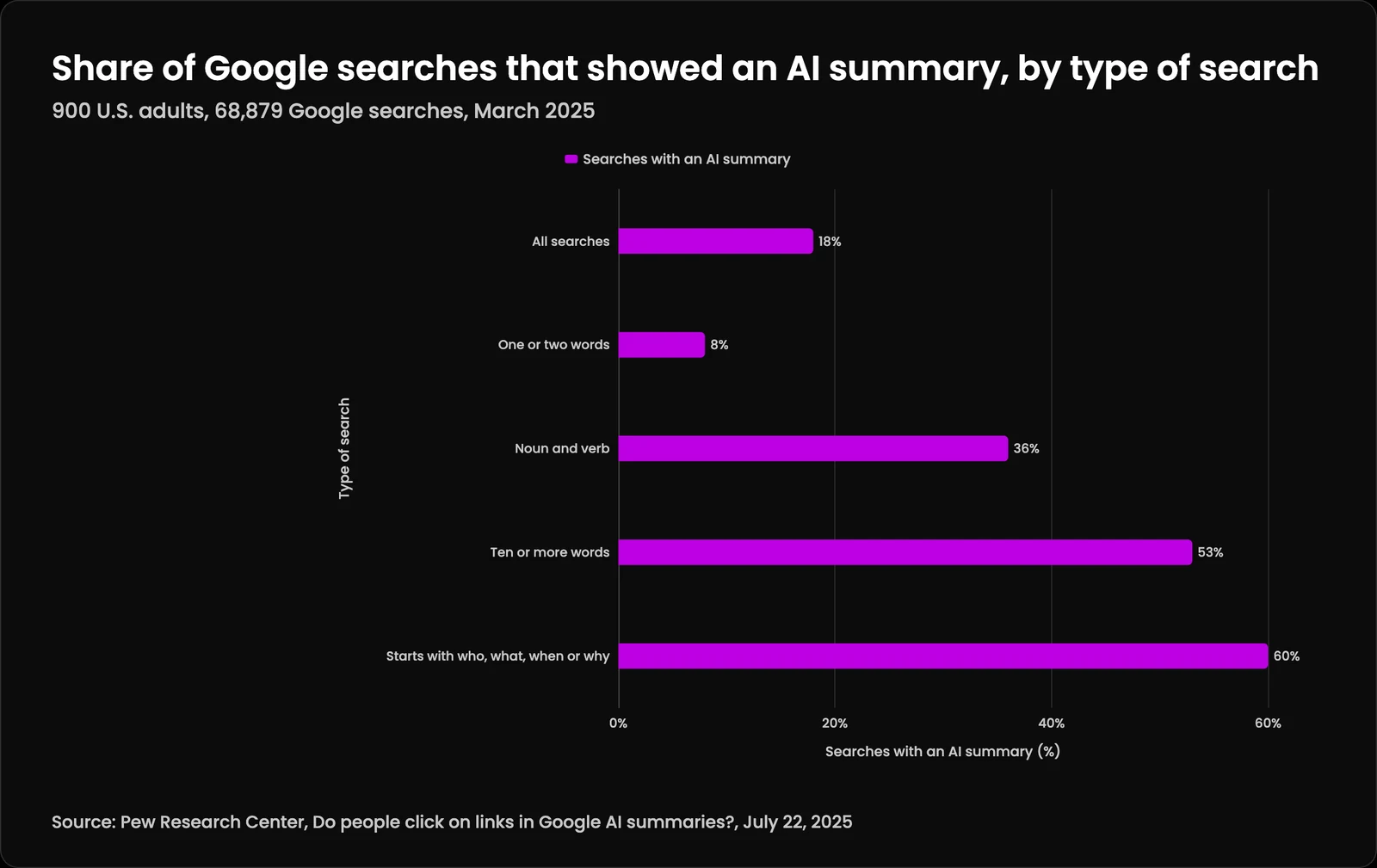
Long searches and questions show them most. Pew Research Center tracked 68,879 Google searches by 900 U.S. adults in March 2025 and found an AI summary on 18% of them. Only 8% of one- or two-word searches produced one, against 53% of searches with ten or more words. Searches that began with who, what, when, or why produced a summary 60% of the time, and searches with both a noun and a verb 36% of the time.
That tells you where to aim. A business is unlikely to show up for a bare service name, and much more likely to show up for the full questions buyers ask before they call: how long a job takes, what it costs to fix something, whether a rule applies to them. Those questions make good section headings, and each one deserves a direct answer in its first sentence.
| Type of search | Searches with an AI summary |
|---|---|
| All searches | 18% |
| One or two words | 8% |
| Noun and verb | 36% |
| Ten or more words | 53% |
| Starts with who, what, when or why | 60% |
How to show up in AI Overviews, step by step
If you are working out how to show up in AI Overviews, take these in order. The first four steps decide whether Google can use your page at all, and the rest decide whether it wants to. The first four are also the ones we most often find broken. If the site itself needs the work, managed website operations covers hosting, speed and publishing.
- Verify the site in Google Search Console and submit a sitemap, so you can see what Google has indexed and why pages are left out.
- Run the URL Inspection tool on your key pages, and check that robots.txt, your CDN and any bot protection allow Googlebot.
- Search the page source for nosnippet and max-snippet. Google's robots meta tag documentation says nosnippet prevents content from being used as direct input for AI Overviews and AI Mode.
- Make sure the answer is in the HTML as text, not only in an image, a PDF or a script that runs late.
- Give each real question its own heading and answer it in the first one or two sentences, then add the detail. Our note on writing for featured snippets shows the pattern.
- Add what only you know. Google's helpful content questions ask whether a page provides original information, reporting, research, or analysis.
- Cite your sources by name and link, and remove any number you cannot back.
- Keep structured data accurate and matched to the visible text, as Google's structured data guidelines require.
- Link related pages to each other so Google finds the full set, and keep pages fast on a phone; our note on Google grading sites on real phones explains why speed counts.
- For a local business, keep the Google Business Profile complete and consistent with the site. Brian Gagne's small business website checklist covers the profile, reviews and domain ownership, and our note on why a Worcester business is missing from Google Maps and AI answers shows the local version of this problem.
- Ask loyal readers to add you as a preferred source; Google says that badge can now appear in AI Mode and AI Overviews for people who chose your site.
- Measure monthly in Search Console's generative AI performance report, and fix what it shows.
Which sources do AI Overviews cite?
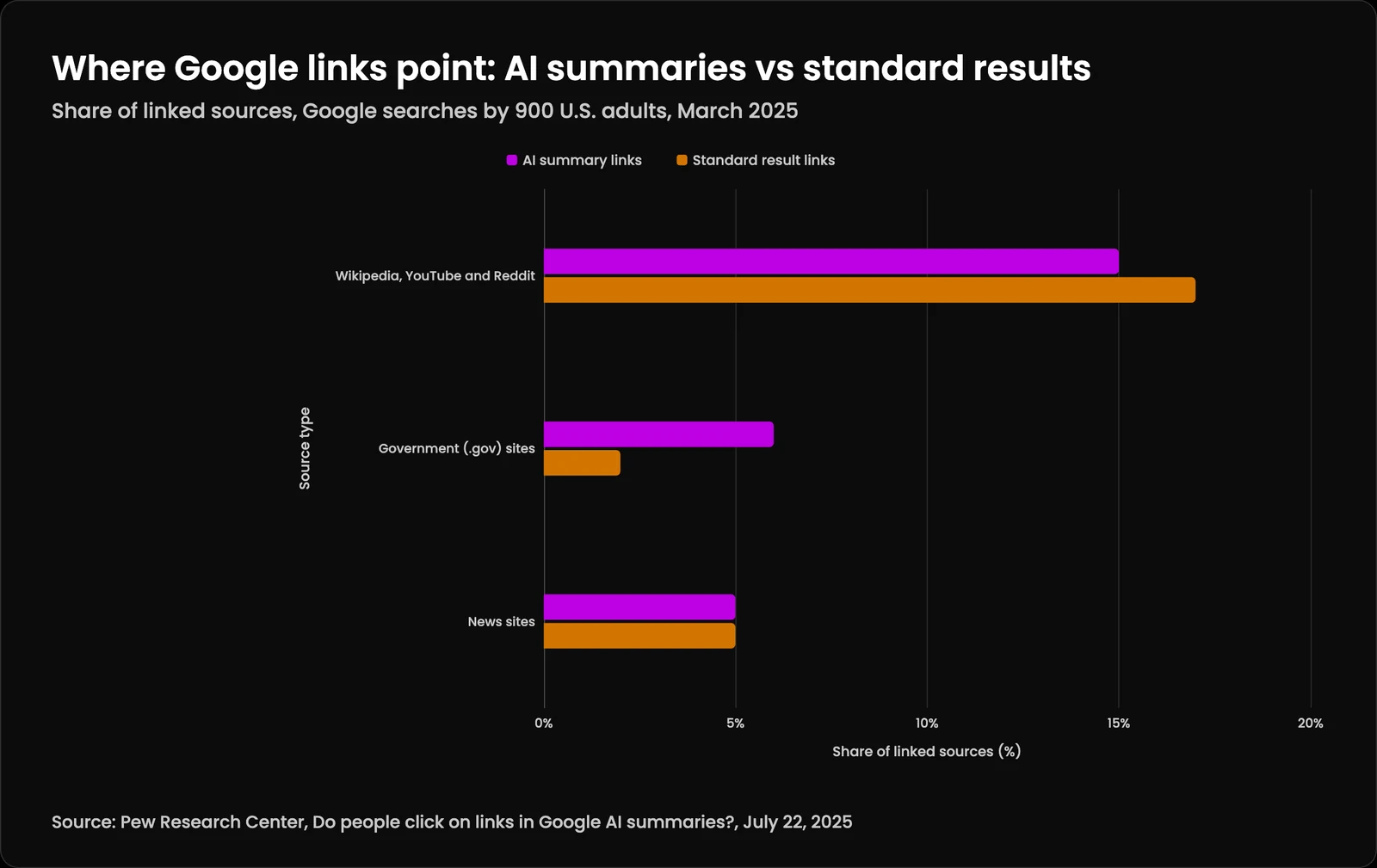
AI Overviews usually cite several pages, so the goal is to be one of them. In the same Pew study, 88% of AI summaries cited three or more sources and the median summary was 67 words long. Wikipedia, YouTube and Reddit together made up 15% of the sources linked in AI summaries and 17% in standard results. Government sites made up 6% of AI summary sources against 2% of standard results, and news sites 5% of both.
Two lessons follow. First, a summary of about 67 words leaves room for one or two lines from each source, so the line you want quoted has to stand on its own. Second, official and well-sourced pages get a larger share of AI summary links than of regular results, which rewards pages that cite primary sources the way this one does. See also how answer engines choose which sources to cite.
| Source type | AI summary links | Standard result links |
|---|---|---|
| Wikipedia, YouTube and Reddit | 15% | 17% |
| Government (.gov) sites | 6% | 2% |
| News sites | 5% | 5% |
Does structured data help you appear in AI Overviews?
It helps Google read the page, but it is not a ticket in. Google's generative AI guide says structured data "isn't required for generative AI search, and there's no special schema.org markup you need to add." Its AI features page lists "making sure your structured data matches the visible text on the page" as a best practice, so markup that claims more than the page says works against you.
Some markup also stopped paying off on its own. Google's Search Central changelog shows the FAQ rich result stopped appearing in Google Search on May 7, 2026, and its documentation was removed on June 15, 2026. FAQ markup can still describe a page accurately; it just no longer earns a special result. Our note on Google teaching Chrome to read structured data covers where markup is heading, and Amelia Gagne explains which types still earn their keep in structured data as an SEO advantage.
Do AI Overviews reduce clicks to websites?
Yes, on average. Pew found that people clicked a traditional search result on 8% of visits when an AI summary appeared, against 15% when none appeared, and clicked a link inside the summary on just 1% of visits. People also ended their browsing on 26% of pages with a summary, against 16% without one.
Google's position is that the clicks that remain are worth more: its AI features page says that when people click from pages with AI Overviews, "these clicks are higher quality." Both can be true. Fewer people click, and the ones who do have already read a summary that may have named you. Being cited is worth having even on searches where nobody clicks, which is the argument in zero-click search is not the enemy.
How do you see if you show up in AI Overviews?
Use Search Console's generative AI performance report. Google introduced it on June 3, 2026 and rolled it out to all websites as of August 31, 2026. It shows how many times links to your site appeared in AI Overviews and AI Mode, broken down by page, country, device and date.
Read it with its limits in mind. The report's help page counts impressions, not clicks, and two links from the same site in one AI feature count as one impression. If the report is missing, the usual reason is too few impressions yet, or a site excluded from those features. Pair it with your analytics for visits. Our monthly reporting runs on LTFI, which can connect to Google Search Console, so this lands in one record.
Can you keep your site out of AI Overviews?
Yes. In Search Console, the Search generative AI control under Settings lets you include or exclude a site from AI Overviews, AI Mode and generative AI features in Discover. Google says the control isn't used as a ranking or inclusion signal for the rest of Search, and that content is excluded within one to two days after the control goes live.
For finer control, nosnippet, data-nosnippet and max-snippet limit what Google shows from a page, and noindex removes it from Search entirely. Google-Extended is a different switch: Google's crawler documentation says it covers Gemini training and grounding and does not affect inclusion in Google Search. Blocking it will not take you out of AI Overviews.
Why isn't my site showing up in AI Overviews?
Usually because a basic requirement is failing, the page doesn't answer the smaller questions the summary is built from, or the search doesn't trigger a summary at all. Check them in that order. The table lists the common causes we find and the quickest check for each. Fixing these is most of how to show up in AI Overviews once a page is live. For small businesses, our guide to answer engine optimization runs the same checks as a monthly routine.
| Symptom | Likely cause | How to check |
|---|---|---|
| Page missing from Google entirely | Not indexed, blocked, or marked noindex | URL Inspection in Search Console |
| Page ranks but is never cited | nosnippet or a tight max-snippet | Search the page source for both |
| Googlebot gets a challenge page | CDN or bot protection rule | Live test in URL Inspection, server logs |
| Answer only in an image or script | No readable text for the passage | View the page with scripts off |
| Page answers a different question | Heading and first sentence miss the query | Compare headings to the questions buyers type |
| Generic content | Nothing beyond what other pages say | Google's helpful content questions |
| Report shows nothing | Too few impressions, or site excluded | Settings, Search generative AI control |
What should you avoid when optimizing for AI Overviews?
Avoid shortcuts Google names in its own documents. Its 2026 guide to generative AI features says that making separate content for every possible variation of a search, to manipulate rankings or AI responses, violates its scaled content abuse spam policy, and that chasing inauthentic mentions across the web "isn't as helpful as it might seem." In May 2026 Google's changelog added that its spam policies also apply to generative AI responses in Search.
Be careful with generated text too. Google's guidance on using generative AI content says it is critical to fact-check and review AI-generated content for accuracy, including metadata. And be wary of tools that promise to reveal how Google's AI ranks you: Google says no third-party tool has access to its internal ranking or AI systems. If you want this done for you, our SEO, AEO, and GEO service follows these rules, and our guide to how to rank in ChatGPT covers the other big answer engine. For the wider idea behind both, read what generative engine optimization is.
Also read
How to show up in AI Overviews: questions people ask
How do I show up in Google AI Overviews?
How to show up in AI Overviews SEO?
Treat it as SEO, because Google does. Its 2026 guide says optimizing for generative AI search is still SEO. Crawlable pages, clear headings, direct answers, original knowledge and a fast page are what earn a place, with no special markup or AI text file needed.How do I get cited in Google AI Overviews?
Write passages that answer one question completely in a sentence or two, and back each claim with a named source. Pew found most AI summaries cite three or more sources, so the aim is to be one of several. Allow Googlebot and avoid nosnippet on pages you want cited.How do Google AI Overviews work?
Google's systems decide whether a summary would add to classic results. If so, they run several related searches, a technique Google calls query fan-out, pull passages from indexed pages, and write a short answer with links to the sources used. AI Mode does the same for longer, conversational questions.Where do AI Overviews get their information?
From pages in Google's Search index. Google says a page must be indexed and eligible to show with a snippet to be a supporting link. Pew found Wikipedia, YouTube and Reddit were the most common sources, and government sites were linked more often in AI summaries than in standard results.Does schema markup help with AI Overviews?
It helps Google understand a page, but Google says it isn't required for generative AI search and there's no special schema.org markup to add. What matters is that the markup matches the visible text. FAQ rich results stopped appearing in Google Search on May 7, 2026.Does llms.txt help you rank in AI Overviews?
No. Google's generative AI guide says Google Search doesn't use llms.txt or similar files, so creating one neither helps nor hurts there. It says such files are fine to keep for other services. Spend the time on crawler access and better answers instead.How often do AI Overviews show up?
On about one in five searches in Pew's March 2025 study, 18% overall. They appeared on 8% of one- or two-word searches, 53% of searches with ten or more words, and 60% of searches beginning with who, what, when or why.Do AI Overviews hurt websites?
They reduce clicks on average. Pew found people clicked a traditional result on 8% of visits with an AI summary against 15% without, and clicked a link inside the summary on 1% of visits. Google says clicks from pages with AI Overviews are higher quality.Can I opt out of AI Overviews on Google?
A site owner can. Use the Search generative AI control in Search Console settings to exclude the site from AI Overviews, AI Mode and Discover's AI features. Google says it is not a ranking signal for the rest of Search. A person searching cannot turn AI Overviews off.Are AI Overviews accurate?
Not always, which is why the sources matter. Google says AI features build answers from indexed pages, so a wrong page can lead to a wrong answer. Write claims you can source, link the source, and correct errors quickly so the page an AI Overview quotes is right.How do I track AI Overview traffic?
Open Search Console's generative AI performance report, available to all sites since August 31, 2026. It shows impressions in AI Overviews and AI Mode by page, country, device and date, but not clicks. Clicks from AI features are counted in the main Performance report under the Web search type, mixed with other results.
Keep reading
More in Automate
- The LTFI Methodology
How the studio builds with AI. The product is at ltfi.ai.
- Multi-Agent Orchestration
Specialized AI agents coordinated as one system that does the work and hands the decisions to a person.
- Knowledge Systems
Search that understands meaning, not just keywords. Answers grounded in your actual data.