


Amelia GagneCo-founder and CEO, Kief Studio
- Published
- Updated
- 11 min read

TL;DR: Retail automation for a Worcester store works best on the dull, repeated jobs: keeping stock counts in sync between the register and the website, sending order and pickup messages, flagging new reviews and drafting reorders a person approves. Start with one daily frustration, keep prices accurate under Massachusetts rules, and let people keep the customer relationship.
Retail automation used to mean conveyor belts and self checkout lanes at big chains. For an independent shop in Worcester, Shrewsbury or anywhere in Central Massachusetts, it means something smaller and more useful: the systems you already pay for start talking to each other, so you stop typing the same number into three screens.
I want to walk through where retail automation earns its place in a local store, where it creates new risk, and what a sensible first quarter looks like. We first published this note in 2025. I have updated it with current federal and state sources and cut the figures we could not trace back to a primary source.
What does retail automation mean for a Worcester store?

Start with who is doing the work. Worcester County had 2,405 retail trade establishments with paid employees in 2023, employing 38,937 people, and 1,088 of those stores had fewer than five employees. (U.S. Census Bureau, County Business Patterns 2023 (opens in a new tab)) Most local retail is run by a handful of people who also do the buying, the books and the social posts.
Then look at where the sales happen. The Census Bureau estimates that e-commerce made up 17.1 percent of total U.S. retail sales in the second quarter of 2026, seasonally adjusted. (U.S. Census Bureau, Quarterly Retail E-Commerce Sales (opens in a new tab)) Put those two facts side by side. Most retail spending still happens in a physical place, and the online share keeps growing. A small store has to be good at both with the same few people.
That is the real job of retail automation for an independent shop. It is less about robots and more about connecting the point of sale, the website, the email list and the supplier orders so a sale in one place updates the others without a person retyping it. In our work that is mostly API integration: small, well tested connections between systems you already own.
Where does a small store lose the most time?

When I sit down with an owner, the time drains are rarely mysterious. They are the tasks that happen every day, follow the same steps and fall apart when someone is out sick.
Keeping stock counts in two places
An item sells at the register, and the website still shows it in stock. A customer orders it online that night, and someone has to call with an apology. Or the reverse: the website shows sold out while three sit on the shelf. Every store that sells in more than one place has some version of this.
Answering the same customer questions
Is my order ready? Do you have this in a medium? Are you open on the holiday? These questions arrive by phone, email, text and social messages, and each one pulls a person away from the customer standing at the counter.
Reordering from memory
Many small shops still reorder by walking the shelves or by gut feel. That works until the person who carries the knowledge in their head takes a week off.
These are the right first targets for retail automation because they are repetitive and rule based, and a mistake is easy to spot and fix.
Which retail automation tools pay off first?

I group useful retail automation into three areas. Pick one to start, not all three.
Inventory sync and reorder alerts
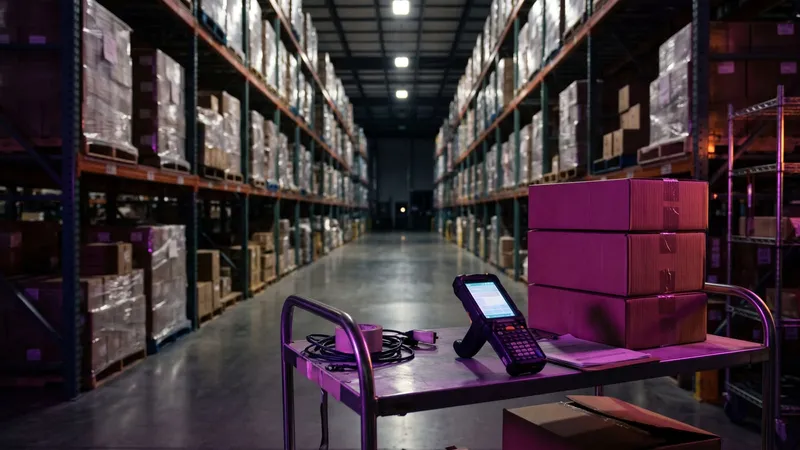
The most valuable retail automation for most stores is a single source of truth for stock. When the register records a sale, the online store updates. When a count drops below a level you set, the system drafts a purchase order and a person approves it before it goes to the supplier.
Accurate stock also helps people find you. Google says a retail store can show its in-store products on its Business Profile, and "your in-store products might show in local search results and customers can find out what's in stock." (Google Business Profile Help (opens in a new tab)) Google Merchant Center describes free local listings as "organic product listings on local surfaces across Google Search, Maps, the 'Products' tab, and on the Google Business Profile." (Google Merchant Center Help (opens in a new tab)) None of that works if the stock data is wrong, which is why inventory sync comes first.
Customer messages that send themselves
Order confirmations, pickup ready notices and receipt emails are pure retail automation: they follow a rule and contain no judgment. Marketing messages are different, because the law treats them differently.
For email, the Federal Trade Commission's guide to the CAN-SPAM Act says "You must honor a recipient's opt-out request within 10 business days" and "Your message must include your valid physical postal address." (Federal Trade Commission, CAN-SPAM Act compliance guide (opens in a new tab)) For texts, the federal telemarketing rules bar autodialed calls that include "an advertisement or constitutes telemarketing" to a cell phone without "the prior express written consent of the called party," and the do-not-call rules apply to "telemarketing calls or text messages to wireless telephone numbers." (eCFR, 47 CFR 64.1200 (opens in a new tab)) Build the consent checkbox before you build the promotion.
Reviews and local listings
Retail automation can watch for new reviews and draft replies. Google advises that "When you reply to customer reviews, it shows that you value their feedback." (Google Business Profile Help (opens in a new tab)) Let the system alert you and suggest wording. A person should read and send each reply, because the tone of a reply is part of your brand.
What automation must never do is write reviews. The FTC's rule on consumer reviews makes it an unfair or deceptive practice for a business to create a review that misrepresents "That the reviewer or testimonialist exists." (eCFR, 16 CFR Part 465 (opens in a new tab)) I wrote more about the human side of this in how to use AI for customer communication (opens in a new tab).
How does Massachusetts law shape retail automation?

One Massachusetts rule matters more than most owners expect: item pricing. The Attorney General's regulation at 940 CMR 3.13 generally requires sellers to "affix to any goods offered for sale to consumers the price at which the goods are to be sold," with exemptions for stores that use electronic scanner systems and meet specific conditions, such as at least one consumer scanner "for every 5,000 square feet of store selling space." (940 CMR 3.13, via Cornell Law School LII (opens in a new tab))
Why price sync is a legal question in Massachusetts
The same regulation says it is an unfair or deceptive practice "to charge a consumer an incorrect price for any item offered for sale," and that the correct price is the lowest of the advertised price, the price on any store sign, shelf label, tag or sticker, or "the price rung up by the store's automated retail system." (940 CMR 3.13, via Cornell Law School LII (opens in a new tab))
Read that next to any retail automation that changes prices. If your website, your shelf tag and your register disagree, the customer is owed the lowest one. Dynamic pricing tools that move online prices without updating the shelf, or a sale that ends online but not at the register, create exactly that gap. Before you automate a price change, make sure every place the price appears updates together, and keep a log of when it changed.
Customer data in your systems
Retail automation also moves customer data between systems. Massachusetts requires every person that "owns or licenses personal information about a resident of the Commonwealth" to keep a written information security program, and to oversee service providers by contract. (201 CMR 17.03, via Cornell Law School LII (opens in a new tab)) In that rule, personal information means a name together with a Social Security number, a driver's license or state ID number, or a financial account or card number. (201 CMR 17.02, via Cornell Law School LII (opens in a new tab)) Every new connection is one more place that data can travel, so list where card and ID data flows before you connect anything. For the platform decision itself, see our note on choosing an e-commerce platform or a custom build in Massachusetts.
What does a first quarter of retail automation look like?

Here is a hypothetical. A gift and home goods shop near Worcester sells in the store and through a small online shop. Three people work there. The owner does the buying and the website. Here is how I would sequence retail automation for that shop.
Month one: one source of truth for stock
- Count once, properly. No retail automation fixes bad starting data. Do a full count and fix the item list: one name, one SKU, one price per item.
- Connect the register and the online store. Most point of sale systems and e-commerce platforms publish an integration or an API for this. Test it with ten items before turning it on for all of them.
- Set reorder levels for the top 20 sellers. The system drafts the order. The owner approves it.
Month two: messages and consent
- Automate order and pickup notices. This is the simplest retail automation, and it saves the most phone calls.
- Add a clear opt-in for marketing at checkout and online, and keep the record of who agreed and when.
- Turn on review alerts. Draft replies with help if it saves time, and send them yourself.
Month three: local visibility and reporting
- Show in-store products on Google once stock data has been accurate for a few weeks.
- Build one weekly report: top sellers, slow movers, items below reorder level and any price mismatches between channels.
- Review what to stop doing by hand. Pick the next task only after the first three months of retail automation run cleanly.
What retail automation mistakes should you avoid?

The failures I see most often are not about technology choice. They are about order and ownership.
- Automating everything at once. Start with the single most annoying daily task. When it runs cleanly for a month, add the next one.
- Buying tools that do not connect. A new app that cannot read your point of sale data creates one more screen to update by hand.
- Letting software change prices on its own. In Massachusetts that is a pricing accuracy question, not only a margin question.
- Skipping staff training. People need to know what the system does, what it does not do and who to call when it breaks.
- Removing the human from the counter. Customers choose a local shop for the person who knows the stock. Retail automation should give that person more time on the floor, not replace them.
Staffing is the other half of this. Brian wrote about how automation helps short staffed Massachusetts teams without cutting the people who hold the business together.
How do you know retail automation is working?
Pick three numbers before you start and write down where they stand today: how many times a week a customer is told an item is out of stock after ordering it, how many hours a week go to manual stock and price updates, and how many customer messages wait more than a day for an answer. Check them monthly.
If retail automation is working, all three move in the right direction within a quarter. If a vendor promises a percentage gain before seeing those numbers, ask where their figure comes from. We would rather leave a number out than print one we cannot source.
Marketing is the natural next step once operations are steady. Our note on sales and marketing automation for Worcester businesses picks up from there, and local SEO in Worcester and how AI helps covers being found nearby.
Frequently asked questions
What is retail automation for a small store?
It is software that handles repeated, rule based work: syncing stock between the register and the website, sending order and pickup notices, drafting reorders and flagging reviews. A person still approves orders, prices and replies.
What should a Worcester retailer automate first?
Usually inventory sync between the point of sale and the online store. It prevents overselling, supports showing in-store products on Google and makes every later retail automation step more reliable.
Can I change prices automatically in Massachusetts?
You can, but 940 CMR 3.13 says the customer is owed the lowest of the advertised, shelf or register price. Every place the price appears must update together.
Do I need consent to send marketing texts to customers?
For autodialed marketing texts to cell phones, federal rules require prior express written consent. Order and pickup notices are a different category. Keep a record of each customer's opt-in.
Can retail automation write reviews or reply to them for me?
It can alert you and draft a reply for you to edit and send. It must never write reviews; the FTC's rule bans reviews that misrepresent who wrote them.
Will retail automation replace my staff?
It should not. In a small shop the goal is to take repetitive screen work off your staff so they spend more time with customers, which is why people shop local.
This article is general information, not legal advice. Kief Studio is not a law firm, and reading it does not create an attorney-client relationship. Laws and regulations change, so check the current text and talk with a licensed Massachusetts attorney about your situation.
Where we fit

Kief Studio is in Shrewsbury, and we work with independent retailers in Worcester, Shrewsbury, Auburn and across Central Massachusetts. Most retail automation we build is integration work: connecting the point of sale, the online store and the email list so stock and prices stay in step, with logs that show what changed and when. When the online store itself needs work, our e-commerce team builds or fixes it, and we host what we build on dedicated machines with no shared hosting.
We start with your counts and your daily frustrations, not a tool list. If a task does not need retail automation, we will say so.
First conversation is free. No commitment.
Co-founder and CEO, Kief Studio
Related articles

Automate
Sales and Marketing Automation for Worcester Businesses: Stop Doing Everything Manually
Marketing automation for Worcester businesses: lead follow-up, review requests and seasonal email, plus the CAN-SPAM and texting rules and a 60-day plan.
Brian Gagne

Automate
How to Choose an SEO Agency in Shrewsbury, MA
Choosing an SEO agency in Shrewsbury, MA: questions Google says to ask, red flags, reporting, reviews, and what the contract should say.
Amelia Gagne

Automate
AI Consultant in Worcester, MA: What One Does and Costs
An AI consultant in Worcester, MA: what the work includes, whether you need one yet, what drives the cost, and how to spot hype before you sign.
Amelia Gagne