


Amelia GagneCo-founder and CEO, Kief Studio
- Published
- Updated
- 12 min read

TL;DR: Ask YouTube is YouTube's conversational search. It launched at Google I/O on May 19, 2026 for U.S. Premium members and reached all U.S. viewers on web, mobile and TV in October. It sends people to the exact video and moment that answers them. Tutorial creators should structure videos for it and keep a direct line to their audience.
Updated October 2026: the first version said Ask YouTube gives viewers a text answer so they never press play, and cited publisher traffic figures we could not trace to a primary source. It now says only what YouTube has published.
When YouTube announced Ask YouTube in May, we wrote that tutorial creators were about to live through what web publishers went through with Google's AI answers. Five months later, Ask YouTube is open to every U.S. viewer, and the picture is clearer. I want to separate what YouTube has actually said from what people guessed, and then give a tutorial creator a short list of things to do this month.
I work on search and answer engines for a living. The pattern here is familiar: a platform puts an answer layer between the question and your work. What you control is how easy your work is to find inside that layer, and whether the people who find you can reach you anywhere else.
What is Ask YouTube?
Ask YouTube is a conversational search mode inside YouTube. YouTube's own description: "With Ask YouTube, you can ask more complex search queries," and "You can even ask follow-up questions to continue refining what you're looking for." It "will compile the most relevant videos across all of YouTube's catalogue," long-form videos and Shorts included, "and provide an interactive, structured response." (YouTube Official Blog, May 19, 2026 (opens in a new tab))
Notice what that says and what it does not. Ask YouTube compiles videos and gives a structured response. YouTube has not said it replaces watching. Our first version said viewers would get a text summary and "never press play." That went further than anything YouTube published, so it is gone.
Who can use Ask YouTube today?
At launch it was narrow: "Ask YouTube is currently available for Premium members aged 18 and up in the U.S. through youtube.com/new." (YouTube Official Blog (opens in a new tab))
On October 12, 2026, YouTube widened it, "making Ask YouTube available to U.S. viewers across web, mobile and TVs." The same post says viewers "will soon be able to use Ask YouTube directly from the watch page while watching Shorts and live streams." (YouTube Official Blog, October 12, 2026 (opens in a new tab)) Tech press reported the mobile rollout the next day and noted it was no longer limited to Premium. (9to5Google (opens in a new tab))
So the "window" our first version described, while Ask YouTube was Premium only, has closed. That version also said 125 million subscribers had access. That number is YouTube's global count of Music and Premium subscribers, trials included, not the U.S. adults who could use the test, so we removed it.
What kinds of questions does it handle?
YouTube's examples are practical: "tips on how to teach your kid to ride a bike," or "creator reviews of cozy games to play before bedtime." (YouTube Official Blog (opens in a new tab)) In October it added that people were asking "how to DIY their Halloween costumes," diving "into video essays," and debating "cutting their own bangs." (YouTube Official Blog (opens in a new tab))
Every one of those is a how-to or a "which one should I pick" question. That is the tutorial creator's home ground.
Why do tutorial creators feel exposed?
Because web publishers have already seen what an answer layer does to clicks, and the numbers are real even if the scariest ones were not.
Pew Research Center tracked the browsing of 900 U.S. adults in March 2025. When a Google search showed an AI summary, people "clicked on a traditional search result link in 8% of all visits." Without one, they clicked "nearly twice as often (15% of visits)." Clicking a link inside the summary itself "occurred in just 1% of all visits to pages with such a summary." (Pew Research Center (opens in a new tab))
The same study found that "Wikipedia, YouTube and Reddit" were the most frequently cited sources in Google's AI summaries, and together they "accounted for 15% of the sources." (Pew Research Center (opens in a new tab)) Your videos are already raw material for answers outside YouTube. Ask YouTube brings the same idea inside it.
Our first version listed traffic drops at named tech publications. Those figures came from a third-party analysis of estimated traffic, not from the publishers, so I have taken them out. The Pew numbers make the point on their own: being cited is not the same as being visited.
Is Ask YouTube the same as AI Overviews?
Not quite. Google's AI Overviews answer on the search page and link out to websites. Ask YouTube stays inside YouTube and points to videos, so the viewer usually lands on a creator's video rather than leaving the platform. That is better for creators than the web publisher situation. The open question is how much of a video people watch once Ask YouTube sends them to the right moment.
Does Ask YouTube affect how creators get paid?
YouTube has not said. Neither of its Ask YouTube announcements mentions monetization, watch time or how a visit from the new search is counted. Anyone telling you the exact effect is guessing.
Here is what is published. YouTube says "55% of ad and subscription revenue goes directly to creators, artists, and media companies through the YouTube Partner Program." (YouTube, How YouTube Works (opens in a new tab)) For Premium, YouTube explains that "we share your monthly membership fee with creators," and "the more videos you watch from your favorite creators, the more money they make." (YouTube Help (opens in a new tab))
Put those next to each other. Premium revenue follows viewing, and Ask YouTube started with Premium members. If a viewer gets to the right minute faster and leaves sooner, the viewing time behind that answer shrinks. If the new search surfaces a long video that would never have ranked for a plain keyword, viewing grows. Both can happen to the same channel. Watch your own numbers rather than anyone's forecast.
What does the wider creative economy expect?
CISAC, the international confederation of authors' societies, published a study in December 2024 estimating that "music and audiovisual creators will see respectively 24% and 21% of their revenues at risk of loss by 2028" from generative AI. (CISAC (opens in a new tab)) That study covers authors' revenues across the industry, not YouTube creators specifically. Read it as direction, not as a forecast for your channel.
Which tutorial formats gain or lose with Ask YouTube?
The quick-answer tutorial is most exposed. "How to do X in three minutes" is exactly what an answer layer can point to and finish quickly. If the only value is one fact, Ask YouTube gets the viewer to that fact faster than your intro does.
The deeper video has more to gain. A walkthrough that explains why, covers the mistakes and shows the variations is harder to reduce to one moment. When Ask YouTube matches a long, specific question, the most complete source has a better chance of being the one it compiles. Follow-up questions also favor a creator who has already answered the next question in the same video or the same series.
Most channels are a mix. The useful move is to look at your catalog and sort it: which videos answer one fact, and which teach something a viewer would stay for.
How do you make videos Ask YouTube can find?
YouTube has not published ranking rules for Ask YouTube, so treat these as good structure that helps any search, not a formula.
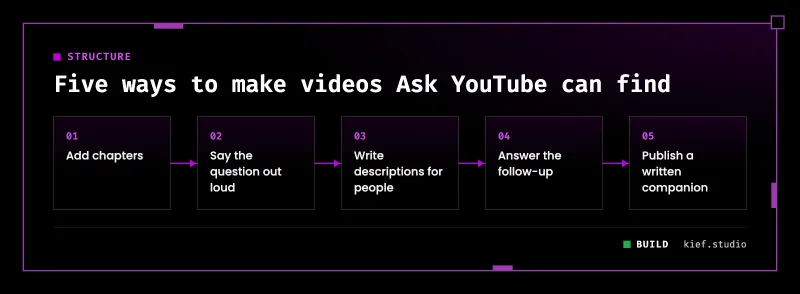
- Add chapters. YouTube says chapters "break up a video into sections, each with an individual preview." To add them, the first timestamp must be "00:00," you need at least three timestamps, and each chapter must be at least 10 seconds long. (YouTube Help (opens in a new tab)) A chapter titled with the question it answers is easy for both a person and a search system to match.
- Say the question out loud. Name the problem in the words a viewer would type, early in the section that answers it.
- Write descriptions for people. A plain summary of what the video covers, in order, beats a wall of keywords.
- Answer the follow-up. Ask YouTube invites follow-up questions. End sections with the next thing people usually ask, and link the video that covers it.
- Publish a written companion. A page on your own site that covers the same steps can be found by Google too. Google says "There are no additional requirements to appear in AI Overviews or AI Mode, nor other special optimizations necessary," beyond being indexed and eligible for a snippet. (Google Search Central (opens in a new tab))
This is the same thinking behind answer engine optimization on the web. I wrote about how AI answer engines select sources (opens in a new tab), and our knowledge base explains how answer engines choose sources in plain terms. Clear structure, specific answers and facts you can back hold up across platforms.
Why does owning your audience matter more now?
Because every change in how people find you is a change you did not vote on. Ask YouTube is a reasonable feature. It is also a reminder that YouTube decides how viewers reach your work, and it can change that whenever it likes.
YouTube's terms say it "reserves the right to suspend or terminate your Google account or your access to all or part of the Service" in certain cases, including a material or repeated breach of the agreement. (YouTube Terms of Service (opens in a new tab)) And you cannot see most of your subscribers by name: on YouTube, subscriptions are private by default. "By default, all settings are set to private." (YouTube Help (opens in a new tab))
A subscriber count is a number on YouTube's dashboard. An email list, a site on your own domain and your own checkout are things you can take with you. Our earlier version told the story of a YouTuber who built an email list after friends lost channels. I could not find a primary source for it, so it is out. The advice stands without it.
What a small owned channel looks like
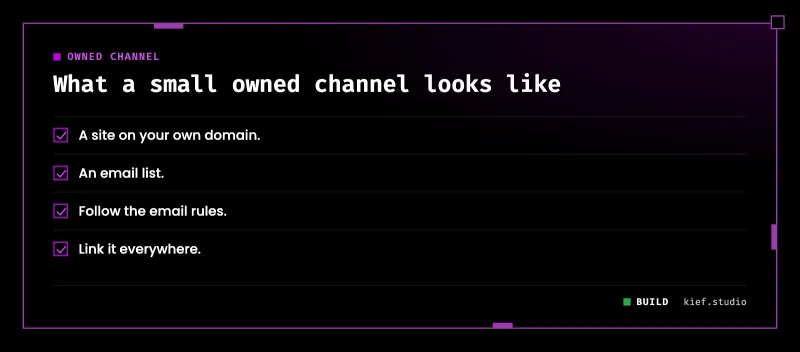
- A site on your own domain. One home for your best tutorials, written guides and a signup form. If you need something quick, a free site at kiefstud.io (opens in a new tab) is a fast start.
- An email list. Offer something useful for joining: the checklist from your most popular tutorial, a parts list, a template.
- Follow the email rules. The FTC's CAN-SPAM guide says "You must honor a recipient's opt-out request within 10 business days," and "Your message must include your valid physical postal address." (Federal Trade Commission (opens in a new tab))
- Link it everywhere. Pin it in comments, put it in descriptions, mention it at the point in a video where people want more.
Treat YouTube as the place people discover you, and your own site and list as the place the relationship lives. I compared the returns on those two in the ROI of a website versus social media (opens in a new tab).
What should a tutorial creator do this month?
- Try it yourself. Ask the questions your videos answer, in full sentences, and note whose videos come back and at which moment.
- Add chapters to your top 20 videos. Title each chapter with the question it answers.
- Sort your catalog. Mark which videos give one quick answer and which teach in depth. Plan the next ones toward depth.
- Write down your baseline. Views, average view duration and revenue for the last 90 days, so you can tell later whether Ask YouTube changed anything.
- Start or grow one owned channel. A list or a site, done properly, before the next platform change.
None of this is a reason to panic. It is a reason to make your work easier to find and your audience easier to reach directly.
Frequently asked questions
What is Ask YouTube?
It is YouTube's conversational search. You ask a full question, can ask follow-ups, and YouTube compiles relevant long-form videos and Shorts into an interactive, structured response.
Who can use Ask YouTube?
It launched on May 19, 2026 for U.S. Premium members aged 18 and up. On October 12, 2026, YouTube made it available to U.S. viewers on web, mobile and TVs. Other countries have no announced date.
Does Ask YouTube stop people from watching my videos?
YouTube has not said so. It points viewers to videos and moments. Whether that raises or lowers your viewing time depends on your format, so track your own numbers.
Does Ask YouTube change creator pay?
YouTube has not published anything on how Ask YouTube visits count toward monetization. Premium revenue is shared based on how much members watch, so viewing time still matters.
How can I help my videos show up in Ask YouTube?
YouTube has not published ranking rules. Clear chapters, spoken questions, plain descriptions and videos that answer the follow-up question are good structure for any search.
Should I build an email list if I already have subscribers?
Yes. Most YouTube subscriptions are private by default, so you cannot contact those people directly. A list you own lets you reach them whatever the platform changes.
This article is general information, not legal advice. Kief Studio is not a law firm, and reading it does not create an attorney-client relationship. Laws and regulations change, so check the current text and talk with a licensed Massachusetts attorney about your situation.
What should a Central Massachusetts business with how-to videos do?
YouTube's conversational search is open to U.S. viewers on web, mobile and TV, so a customer in Worcester or Shrewsbury can already use it. (YouTube Official Blog (opens in a new tab)) That matters for any local business that posts how-to videos: a contractor explaining a repair, a salon showing aftercare, a shop walking through setup. The questions your customers ask on the phone are the same full-sentence questions this kind of search is built for.
- Type the three questions you hear most into it, and note whose videos come back.
- Add chapters to your best how-to videos and title each one with the question it answers.
- Put the same steps on a page of your own site that names your town and service, so Google can find it too.
That last step is where search and answer engine work for local businesses pays off, because the page keeps working when a platform changes. Our notes on local SEO for Worcester service businesses and on sites that still answer near-me searches like a brochure cover the written side.
Where we fit
Kief Studio supports creators on the technical side, the way our creator services note puts it: you create, we handle the tech. If you want a simple site fast, kiefstud.io is the quicker door into the same studio. When the site has to do more, we build it, host it on dedicated infrastructure and keep it running.
Our SEO, AEO and GEO work writes true pages, structures them and keeps the site fast, so your written guides can be found in search and quoted in AI answers. If keeping the site current has become a second job, managed website operations means we host it, publish on a schedule and watch it.
First conversation is free. No commitment.
Co-founder and CEO, Kief Studio
Related articles

Build
Cannes Lions Started Rewarding Systems. Does Your Creator Business Have One?
Cannes Lions 2026 judged the systems behind brands. Apply it to your creator business: own your site, list, sales and records, and use platforms for reach.
Amelia Gagne

Build
Brands Are Adding AI to Creator Marketing. The One Thing They Can't Generate Is an Owned Audience
Brands are adding AI to creator marketing, but creator ad spend still grew. Why an owned audience is what keeps creators paid, plus New York's AI ad label rule.
Brian Gagne

Build
Only About 4% of Creators Earn Over $100K. What Actually Drives Creator Income?
Creator income is lopsided: about 4% of creators earn over $100K. Where the money comes from, what platforms pay, and how to build income you control.
Amelia Gagne